




Home Battery Backup Without Solar: Yes, It Works
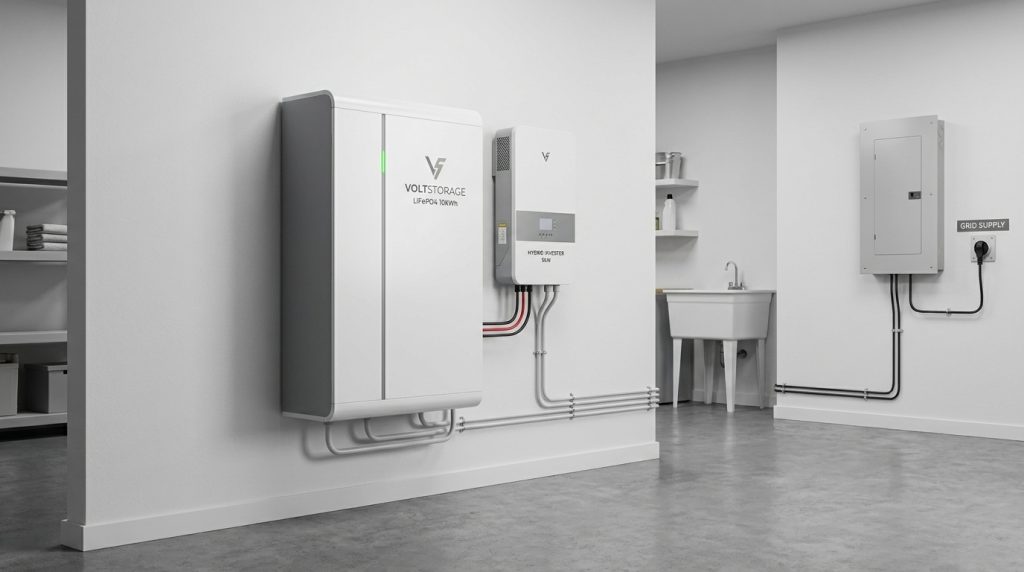
Home battery backup without solar works by charging the battery from the electric grid and using stored power during outages or peak-rate periods. It is best for homeowners who want quiet, automatic outage protection without rooftop PV. The tradeoff is simple: no solar recharge during long blackouts and weaker ROI unless TOU rates make grid charging worthwhile.
A battery does not care whether its energy came from solar panels or the grid. What matters is the charging source, inverter setup, battery capacity, and which circuits you want to protect. For many homeowners, a no-solar system is a practical first step: install backup power now, protect essentials during outages, then add solar later if the roof, budget, or rate plan makes sense.
Can home battery backup work without solar?
A home battery backup without solar works by charging from the grid, then discharging through an inverter when the grid fails or electricity rates rise. Solar panels are optional, but without them, runtime depends only on stored kWh.
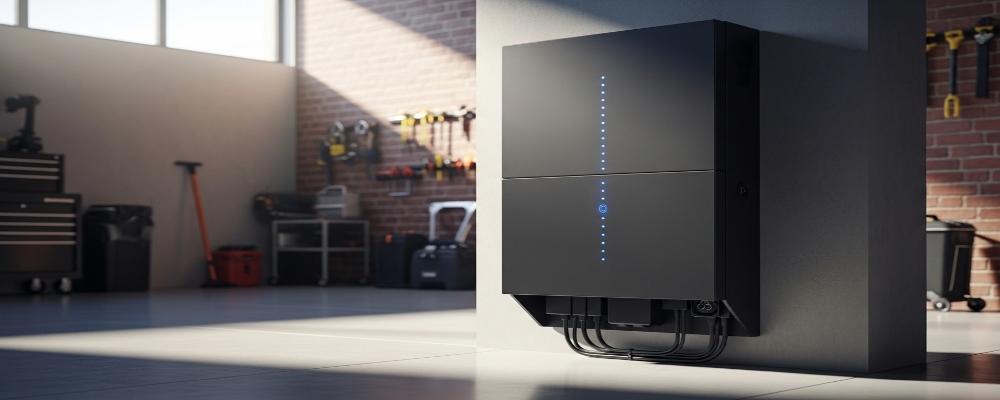
This setup is often called a grid-charged battery backup system. The battery charges when utility power is available. During an outage, the inverter converts stored DC battery power into AC power for selected home circuits.
The main limit is recharge. With solar, the battery may refill during daylight. Without solar, the battery can only use the energy already stored before the outage. That makes load planning more important, especially if you want protection through long blackouts.
For a wider overview of battery roles, inverter options, and full home storage design, the home energy storage system guide should handle the broader ESS topic.
How does a grid-charged battery backup system work?
In a no-solar setup, the grid charges the battery through an inverter/charger. During an outage, the inverter sends stored energy to selected circuits through a backup panel or transfer setup, so essential loads keep running safely.
The system usually includes a battery, an inverter/charger, a battery management system, and a protected load panel. The inverter/charger controls charging from the grid and power delivery during an outage. The battery management system protects the battery from unsafe voltage, current, and temperature conditions.
A proper setup also needs safe transfer equipment. This prevents battery power from feeding backward into utility lines. That part matters for installer safety, utility safety, and local electrical compliance.
Core parts in a no-solar system
A typical battery-only home backup setup includes:
- Grid connection for charging
- Hybrid inverter or inverter/charger
- LiFePO4 battery module
- Battery Management System
- Backup loads panel
- Transfer switch or automatic transfer function
- Energy management app or controller
For homeowners who want a deeper wiring overview, Voltalink’s backup wiring setup page is the right next step.
What happens when the grid fails
When the grid drops, the inverter detects the outage and switches backed-up circuits to battery power. The change can be automatic if the system is designed that way. Your main panel may still be dark, but selected loads can keep running from the backup panel.
This is why a battery-only system is not the same as plugging a power station into a wall outlet. A real home setup needs controlled charging, safe disconnection from the grid, and correct circuit selection.
What can it power during an outage?
A battery-only backup can run essential loads first, such as refrigeration, lights, internet, chargers, and some medical devices. Whole-home backup is possible, but large loads like central AC or electric heating usually require more inverter power and more battery capacity.
The smart starting point is to separate essential loads from comfort loads. Essential loads keep the home safe and functional. Comfort loads, such as central air conditioning, ovens, water heaters, and large pumps, can drain a battery fast.
| Load type | Good fit for no-solar backup? | Why it matters |
|---|---|---|
| Refrigerator | Yes | Protects food during outages |
| Router and modem | Yes | Keeps remote work and communication online |
| LED lights | Yes | Low power draw and high value |
| Phone and laptop chargers | Yes | Small load, high usefulness |
| CPAP or medical device | Yes, with reserve planning | Needs dependable overnight power |
| Small fan | Often | Useful in short outages |
| Central AC | Maybe | Needs high inverter output and more kWh |
| Electric oven or heater | Usually no | Drains battery quickly |
| Well pump | Maybe | Needs surge load check |
Essential-load backup
Essential-load backup protects the circuits that matter most. This is usually the best value for no-solar buyers because it stretches battery runtime and avoids overbuilding the system.
For most homes, this means refrigerator, internet, lights, chargers, and one or two priority devices. Voltalink’s essential-load circuits guide fits naturally here because circuit choice decides how long the battery feels useful in a real outage.
Whole-home backup
Whole-home backup is possible, but it costs more and needs careful sizing. The system must handle both energy capacity in kWh and instant output in kW. A large load may start for only a few seconds, but that surge can exceed a small inverter’s limit.
Do not size the system around central AC unless the budget supports it. For many no-solar buyers, essential-load backup gives better outage protection per dollar than trying to run everything.
How long will a home battery last without solar?
Without solar, runtime equals usable battery capacity divided by the load you keep running. A 10 kWh battery can last many hours or more than a day for essentials, but large HVAC or heating loads can drain it much faster.
A simple runtime formula is: usable battery kWh divided by average load kW. If your essential loads average 0.5 kW, a 10 kWh battery gives about 20 hours before losses and reserve settings. In real systems, inverter efficiency and backup reserve reduce usable runtime.
The U.S. Energy Information Administration shows that household electricity use varies by region, home type, and equipment. That is why runtime should be based on your own loads, not a generic promise.
Simple runtime formula
Use this quick estimate:
| Battery size | Average essential load | Rough runtime before losses |
|---|---|---|
| 5 kWh | 0.5 kW | 10 hours |
| 10 kWh | 0.5 kW | 20 hours |
| 16 kWh | 0.5 kW | 32 hours |
| 16 kWh | 1.0 kW | 16 hours |
This table is only a planning tool. Real runtime changes with battery reserve, inverter loss, temperature, and load spikes.
Example: fridge, router, lights, and chargers
Here is a simple no-solar runtime calculator example:
| Load | Estimated watts | Hours per day | Daily energy |
|---|---|---|---|
| Refrigerator | 150 W average | 24 | 3.6 kWh |
| Router and modem | 20 W | 24 | 0.48 kWh |
| LED lights | 60 W | 5 | 0.3 kWh |
| Laptop and phones | 100 W | 5 | 0.5 kWh |
| CPAP or small medical device | 40 W | 8 | 0.32 kWh |
| Small fan | 50 W | 8 | 0.4 kWh |
| Estimated daily total | 5.6 kWh |
In this example, a 5.12 kWh battery may cover a short outage with careful load use. A 10 kWh or 16 kWh class system gives more breathing room. For deeper capacity planning, see Voltalink’s battery kWh tiers guide.
Is a battery-only backup worth it without solar savings?
A battery-only system is worth it when outage protection matters more than maximum bill savings. It can reduce costs on strong TOU plans, but without solar generation, it usually has weaker ROI than solar-plus-storage.
A battery-only setup is a resilience product first. It helps when power cuts interrupt work, refrigeration, medical devices, or basic comfort. The value is easier to justify when outages are frequent, long, or costly for your household.
It is not always the best ROI choice. It works when outage protection is the main need, but solar-plus-storage is usually stronger when the goal is long-term bill reduction. Without PV generation, you still buy the energy from the grid.
Some battery storage projects may qualify for tax benefits depending on install date, capacity, and current rules. The IRS Residential Clean Energy Credit page says battery storage technology must meet capacity requirements and should be claimed for the year it is installed, not just purchased.
| Your situation | Battery-only setup | Battery plus solar | Best fit |
|---|---|---|---|
| Short outages | Strong fit | Strong fit | Battery-only can be enough |
| Multi-day outages | Limited unless large | Better with daytime recharge | Solar plus battery |
| Remote work backup | Strong fit | Strong fit | Battery-only if outages are short |
| Maximum bill savings | Limited | Stronger | Solar plus battery |
| Lower project scope | Strong fit | More complex | Battery-only |
| Future roof repair planned | Good first step | Add later | Battery now, solar later |
For outage-focused homeowners, Voltalink’s outage protection resource is the better next read than a pure solar ROI guide.
Where does TOU arbitrage still make sense?
TOU arbitrage makes sense when the price gap between off-peak and peak electricity is large enough to cover battery losses and still leave savings. The battery charges when grid power is cheaper, then discharges when grid power is more expensive.
This should be treated as a bonus, not the main reason to buy, unless your local rate plan has a strong spread. You also need to keep enough reserve for outages. A system that empties itself every evening may not be ready when the grid fails at night.
| Rate-plan situation | Battery behavior | Decision |
|---|---|---|
| Large peak/off-peak spread | Charge cheap, discharge during peak | TOU savings may help |
| Small rate spread | Savings are weak after losses | Buy only for backup value |
| Frequent outages | Keep a higher reserve | Prioritize resilience |
| Rare outages and weak TOU | Limited financial case | Consider smaller backup |
| Solar planned later | Use grid charging now | Keep future PV compatibility |
A simple calculation is: kWh shifted x price difference, then subtract efficiency loss. If you shift 8 kWh and the price difference is meaningful, the savings may help. If the spread is small, the battery’s real value is still backup power.
The U.S. Department of Energy describes battery storage as quiet, scalable, and useful for resilience. That value can matter even when bill savings are modest.
Which Voltalink battery fits a no-solar backup setup?
The right Voltalink battery depends on what you want to protect, how long outages last, and whether you plan to add solar later. Start with essential loads, then move up in capacity if you need longer runtime or more circuits.
| Buyer situation | Voltalink-style fit | Why it fits |
|---|---|---|
| Short outage protection for router, lights, fridge, and chargers | 5.12 kWh UPS Backup Battery | Good fit for compact essential-load backup |
| Remote worker who needs several hours of internet, laptop, lighting, and refrigeration | 5.12 kWh to 10 kWh class setup | Keeps the highest-value loads online |
| Homeowner who wants longer essential-load runtime | 16.07 kWh High Capacity Battery | More stored energy for longer outages |
| Wall-mounted residential storage preference | 16.07 kWh Wall Mount Lithium Battery System | Cleaner home installation format |
| Buyer planning solar later | Solar-ready wall mount or hybrid-compatible system | Protects the upgrade path |
| Larger backup plan with inverter integration | Hybrid or off-grid style system | Better fit when inverter matching is central |
A 5.12 kWh system can be a practical entry point for short outages. A 16.07 kWh module makes more sense when the buyer wants longer runtime, more circuits, or more reserve. The key is to size for the loads you will actually keep running.
Do not buy capacity only by looking at the battery label. Check usable kWh, inverter output, surge rating, communication compatibility, and expansion options. A battery with more kWh still needs the right inverter to run your chosen circuits.
Can you add solar later?
You can add solar later if the battery and inverter are designed for it. Before buying, confirm PV input limits, AC-coupling support, communication compatibility, and whether the system can expand without replacing the core hardware.
This is a smart path if your roof is not ready, your budget is staged, or you want backup power now. The battery can run as a grid-charged system first. Later, solar panels can refill the battery during the day if the inverter and system design support it.
Before buying, ask these questions:
- Does the inverter support PV input or AC coupling?
- What is the PV voltage and current limit?
- Can the battery communicate with the inverter through CAN or RS485?
- Can more battery modules be added later?
- Will adding solar require a new electrical design?
- Can the installer support both phases of the project?
A no-solar system should not block a solar future. For the broader solar-ready design path, use the hybrid solar battery system guide instead of trying to cover every PV design detail here.
What safety, installation, and shipping checks matter?
Safety starts with correct installation. A home battery system should use certified equipment, proper overcurrent protection, correct transfer equipment, and a qualified installer. The goal is simple: power the home during an outage without backfeeding the grid or overloading the system.
LiFePO4 batteries are widely used for home storage because they offer stable chemistry and long cycle life. Even so, the full system still needs a Battery Management System, safe enclosure placement, correct cable sizing, and local electrical approval.
Installation checks
Use this checklist before purchase or installation:
- Confirm inverter output matches the backed-up loads.
- Confirm surge capacity for pumps, compressors, or motors.
- Decide essential-load panel or whole-home backup.
- Set a minimum backup reserve in the energy app.
- Check indoor or outdoor rating for the battery location.
- Ask how the system prevents grid backfeed.
- Confirm local permit and inspection requirements.
For a medical-device scenario, do not depend on the full home staying powered. Put the device, internet, and a few lights on backed-up circuits. Then keep enough battery reserve for overnight use.
Shipping and documentation checks for imported batteries
Lithium batteries can involve transport rules, packaging rules, and shipping documentation. The PHMSA lithium battery guide gives scenario-based shipping guidance, and the U.S. Department of Transportation explains that lithium batteries must be packaged and marked properly for transport.
This does not mean homeowners need to become customs experts. It does mean suppliers and freight partners should provide the right documents, labels, and battery transport details. If a shipment is delayed, ask for the battery classification, packing information, test documentation, and carrier status before guessing the cause.
What to Do Next
A home battery backup without solar is a practical choice when you want quiet outage protection without a rooftop PV project. Start by listing the loads you cannot lose, then estimate daily kWh, inverter power, and the outage length you want to cover.
Choose a smaller essential-load setup if your goal is short backup for work, food, lights, and communication. Choose a larger, expandable system if you want longer runtime or future solar. Before purchase, confirm battery capacity, inverter compatibility, reserve settings, and whether the system can grow with your home.
Frequently Asked Questions
Can I have battery backup without solar?
Yes, you can have battery backup without solar. The battery charges from the grid and supplies stored electricity during outages or peak-rate periods. You need the right inverter/charger and safe connection to backed-up circuits.
Can I charge my home battery from the grid?
Yes, many home battery systems can charge from the grid. The installer or energy management system can schedule charging during off-peak periods if your rate plan supports it. The battery can then discharge during outages or expensive peak periods.
Is it worth getting battery storage without solar?
It can be worth it if you mainly want outage protection or have a strong TOU rate plan. It is usually less attractive for pure bill savings because there is no solar generation to offset grid electricity purchases.
Can a battery power my whole house during an outage?
Yes, but whole-home backup usually needs a larger inverter and multiple battery modules. A smaller system is better for essential circuits like the fridge, router, lights, chargers, and medical devices. Match the system to your peak load and runtime target.
How much battery capacity do I need?
Start by listing the loads you must keep running, then multiply watts by hours of use. A small essential-load setup may use 5 to 10 kWh per day, and larger homes or HVAC loads may need much more.
Can I add solar panels later?
Yes, if the battery and inverter support solar input or AC coupling. Before buying, confirm PV voltage limits, communication compatibility, expansion options, and whether your installer can add solar without replacing the core system.
Are home batteries safe?
Modern home batteries can be safe when they use proper BMS protection, certified equipment, and professional installation. The system still needs correct wiring, transfer equipment, placement checks, and compliance with local electrical and fire rules.

-

 OEM Residential Energy Storage Solutions: Passive vs. Active Cell Balancing
2026-09-30
-
 Smart Home Battery with BMS Communication: Cybersecurity and BMS Safety
 -
 10kWh Home Battery Backup System: Is 90% DoD Better for Daily Solar Storage?
2026-09-29
-
 Integrated Home Energy Storage System 150–430V MPPT Design
2026-09-28
-
 LiFePO₄ Residential Backup Battery SOC Accuracy in Parallel Systems
Share this:





.svg)






-899.svg)


