




Battery Backup & Power Outage Protection 2026
Battery Backup & Power Outage Protection in 2026 is about keeping critical home loads running safely when the grid fails. For most homeowners, a battery is best for quiet automatic backup, a generator is better for multi-day fuel-based runtime, and both may be smartest in hurricane or wildfire regions. Start with essential circuits, realistic runtime, certified installation, and clear documentation for insurers.
Power outages now affect comfort, work, food storage, medical equipment, and home safety. A backup plan should not start with the biggest battery you can buy. It should start with what must stay on, how long outages usually last in your area, and what setup your installer can document properly. This guide walks through the practical choices before you ask for quotes.
What does battery backup and power outage protection mean in 2026?
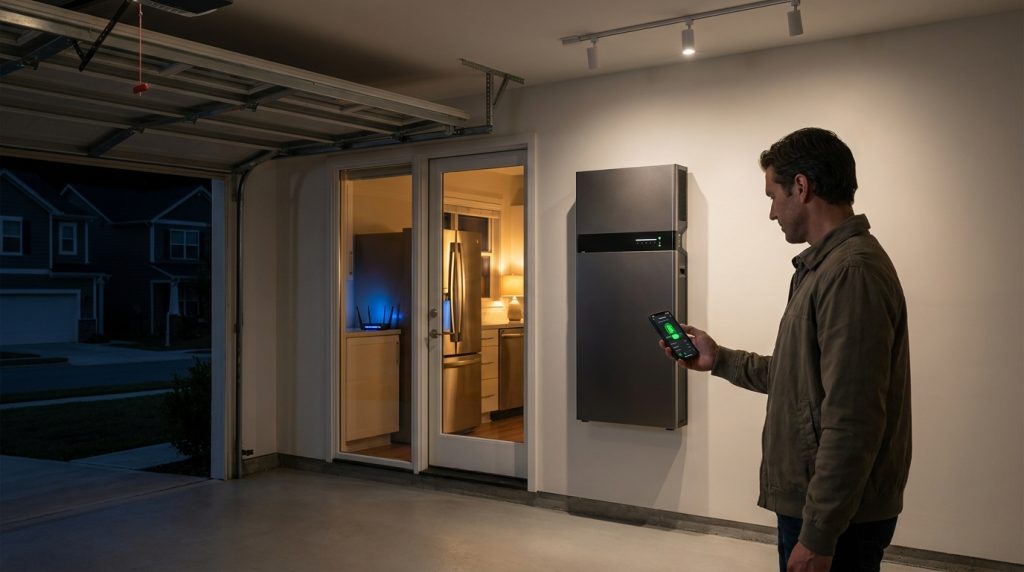
Battery backup and power outage protection means using stored electricity to keep selected home loads running when the grid fails. In 2026, the smart choice starts with load priority, not just battery size.
A home battery backup is different from a small computer UPS. A UPS may keep a desktop or router running for a short time. A home battery system connects to selected circuits or the whole electrical panel through approved equipment, then powers those loads during an outage.
For a wider view of system design, battery chemistry, solar charging, and inverter options, use VoltaLink’s home energy storage system guide. This article stays focused on outage protection, runtime, battery vs generator choices, automatic switchover, and install documentation.
The main mistake is asking, “What battery size should I buy?” before asking, “What do I need to keep alive?” A fridge, internet router, lights, phone charging, and medical device may need a very different setup than central AC, electric water heating, and whole-home backup.
Quick verdict: should you choose a battery, generator, or both?
Choose a battery for quiet automatic backup, a generator for long-duration fuel-based backup, and both if outages can last days. For hurricane or wildfire regions, a hybrid plan is often more resilient than either option alone.
A battery is the cleaner choice for short and medium outages because it can switch on automatically and run without fuel. A generator still makes sense when outages last longer than the battery can support. The safety issue is setup. The U.S. Consumer Product Safety Commission warns that generators can create carbon monoxide, fire, and electrical shock risks if used incorrectly.
| Option | Best for | Weak point | Safety concern | Buyer verdict |
|---|---|---|---|---|
| Battery only | Quiet automatic backup for essential loads | Finite runtime without recharge | Must be installed and isolated correctly | Best for daily outage protection |
| Generator only | Long outages when fuel is available | Noise, fuel, maintenance, manual setup | Carbon monoxide and unsafe backfeed | Best for extended runtime |
| Battery plus generator | High-risk homes and multi-day outages | Higher planning cost | Both systems need safe connection | Best for hurricane-prone homes |
A whole-home battery is not always the smartest first purchase. It works when the budget and load profile support it, but essential-load backup is usually safer and more affordable for outage protection. For long regional outages, battery plus generator often gives the best balance.
What should you keep running first during an outage?
Start with essential loads, not the whole house. Most homeowners should protect refrigeration, lights, internet, charging, medical devices, sump pump, and selected outlets before adding HVAC or luxury loads.
Your backup plan should begin with a short list of circuits. This helps the installer size the battery, inverter, and backup panel more accurately. It also helps you avoid paying for capacity you may rarely use.
The U.S. Census Bureau has reported that outages affect households in different ways, including homes with electrically powered medical devices. That is why a “comfort load” and a “safety load” should not be treated the same.
| Priority | Loads to consider | Why it matters |
|---|---|---|
| Critical | Medical device, refrigeration, basic lighting | Protects health and food |
| Communication | Wi-Fi, phone charging, laptop charging | Keeps alerts and work access active |
| Safety | Garage door, security system, sump pump | Helps with access and water risk |
| Comfort | Fans, small AC, selected outlets | Improves daily living |
| High load | Central AC, electric oven, water heater | Requires larger design |
For a deeper circuit-level planning step, review VoltaLink’s guide to essential backup circuits. This article uses that idea as the starting point for outage protection.
How long will a home battery actually run during a power outage?
Battery runtime depends on usable kWh divided by the loads running at the same time. A smaller essential-load plan can last many hours longer than a whole-home plan using the same battery.
Runtime is not fixed by the battery label alone. It depends on usable energy, active loads, inverter limits, temperature, and whether solar can recharge the system during the outage. NREL’s residential battery storage benchmark gives useful context for how home batteries are treated in stationary storage planning and cost models.
Simple runtime formula
Use this simple estimate before asking for quotes:
Usable battery kWh ÷ active load kW = estimated runtime hours
For example, a 10 kWh usable battery supporting a 0.7 kW essential-load bundle could last about 14 hours before losses and reserve settings. The same battery supporting 2.5 kW of mixed home loads may last about 4 hours.
Example runtime scenarios
| Scenario | Example active loads | What it teaches |
|---|---|---|
| Storm-night essentials | Fridge, Wi-Fi, phones, LED lights, medical device | Small loads stretch runtime |
| Central AC reality check | AC compressor plus normal home loads | Output and surge matter |
| Work-from-home outage | Router, laptop, lights, fridge | Battery can protect productivity |
| Long hurricane outage | Battery overnight, generator support later | Hybrid backup protects runtime |
A 10 kW battery is not the same as a 10 kWh battery. kW is power output at a moment. kWh is energy stored over time. When reviewing quotes, ask for usable kWh, continuous output, surge rating, and expansion options. For sizing ranges, see VoltaLink’s battery kWh tiers.
How does automatic outage switchover work?
Automatic switchover works by detecting grid loss, isolating backup circuits from the utility, and letting the battery inverter power approved loads. The homeowner should not need to plug in cords or manually rewire the house.
When the grid goes down, the system must separate backed-up circuits from the utility grid. This prevents unsafe backfeed and allows the inverter to power only the approved loads. The exact design can vary, but the homeowner experience should feel simple.
- The grid fails.
- The battery system detects the outage.
- Transfer equipment isolates the backup loads.
- The inverter supplies power to the approved circuits.
- The system reconnects after grid power returns safely.
This is where installation quality matters. A battery system is a permanent electrical upgrade, not a portable gadget. The quote should explain which circuits are backed up, how transfer equipment works, and what happens when the grid comes back.
If the installer plans a separate backup panel, ask for a clear circuit list. VoltaLink’s backup wiring plan can help you understand what should be included before the work starts.
Battery vs generator: what are the real tradeoffs?
Batteries win on quiet, automatic, low-maintenance backup. Generators win on long runtime when fuel is available. The safest answer for long regional outages may be battery for everyday backup plus generator support for extended events.
A battery is usually better for short outages, nighttime backup, and homes where noise or fuel handling is a problem. It can turn on without the homeowner going outside, and it can work with solar if the system is designed for backup charging.
A generator is not outdated for every homeowner. It is still useful for multi-day outages, but it becomes risky when fuel storage, carbon monoxide safety, and manual setup are ignored. Generator placement and connection must be handled carefully.
Where batteries win
| Factor | Battery backup advantage |
|---|---|
| Noise | Quiet operation |
| Automation | Can switch on without manual setup |
| Maintenance | Fewer routine service tasks |
| Indoor comfort | No outdoor fueling during the outage |
| Solar pairing | Can recharge from solar if configured |
Where generators still make sense
| Factor | Generator advantage |
|---|---|
| Long runtime | Can keep running if fuel is available |
| Heavy loads | May support large loads more easily |
| Recharge support | Can support a hybrid backup plan |
| Remote properties | Useful where grid restoration takes longer |
For many homes, the real choice is not “battery or generator forever.” It is which system should handle the first hours of an outage, and which should support the home when restoration takes days.
What changes if you live in a hurricane or wildfire region?
Homes in hurricane or wildfire regions should plan for longer outages, harder logistics, and less predictable restoration. A short backup window may be fine for a normal storm, but it may not be enough when roads, fuel supply, or utility work are disrupted.
The best hurricane-region setup is often not battery or generator. It is a battery for automatic short-term protection and a generator plan for long restoration windows. In wildfire areas, battery-first backup can be useful during planned shutoffs, smoke events, or evacuation preparation.
| If your risk is… | Plan for… | Better backup choice |
|---|---|---|
| Short grid outage | Fridge, lights, internet, charging | Battery only |
| Multi-day hurricane outage | Essential loads plus recharge plan | Battery plus generator |
| Wildfire shutoff | Automatic backup and quiet operation | Battery first |
| Medical device dependence | Conservative sizing and documentation | Battery plus backup plan |
| High cooling need | AC surge and runtime review | Larger system or hybrid setup |
Solar can extend backup during daylight, but only if the system can recharge while islanded from the grid. Do not assume every solar system works during outages. If you are deciding between full and partial backup, compare the whole-home backup tradeoffs before sizing the system.
What should an insurance-friendly battery backup install include?
An insurance-friendly battery backup install should be documented like a permanent electrical upgrade. Keep the permit, inspection record, equipment specs, circuit list, installer invoice, photos, and emergency shutoff details in one file.
Insurance underwriters usually want confidence that a system was installed safely and can be understood later. You do not need to guess what every insurer will ask. You need a clean documentation packet that proves the system was planned, installed, and inspected properly where required.
| Documentation item | What to keep |
|---|---|
| Installer details | Company name, license details, invoice |
| Permit record | Permit number and approval record if required |
| Inspection record | Final inspection or sign-off if required |
| Equipment list | Battery, inverter, transfer equipment, disconnects |
| Product documents | Datasheets, manuals, warranty files |
| Circuit list | Backed-up loads and panel labels |
| Load calculation | Installer’s sizing notes or worksheet |
| Location photos | Battery, inverter, panel, disconnects |
| Emergency shutoff details | Clear photo and written location |
| Maintenance plan | Service schedule and owner responsibilities |
This checklist is also useful when selling the home. A future buyer, inspector, or insurer can see what was installed and how the backup system is intended to operate.
What size system should you shortlist before asking for quotes?
Do not ask installers for “a battery backup” without a load plan. Ask for quote options based on essential, comfort, and whole-home tiers. Each tier should show usable kWh, continuous output, backed-up circuits, and expansion options.
The IRS residential clean energy credit page states that qualified battery storage technology must have at least 3 kWh capacity. If incentives matter to your budget, ask your tax professional and installer how the system is documented.
| Quote tier | What it backs up | Ask the installer to confirm |
|---|---|---|
| Essential | Fridge, lights, internet, charging, medical device | Usable kWh and circuit list |
| Comfort | Essentials plus fans, outlets, small AC | Continuous output and surge rating |
| Whole-home | Most or all household loads | Load management and runtime limits |
| Hybrid | Battery plus generator support | Safe transfer setup and recharge plan |
Central AC deserves special attention. A homeowner may think, “I just need one battery for the house,” but AC start-up surge and long runtime can change the design. Ask whether a soft starter, load management, or a larger inverter is needed.
For a more detailed sizing comparison, use VoltaLink’s kWh sizing tiers before reviewing installer proposals.
What should you ask an installer before signing?
Before signing, ask direct questions that connect the quote to your outage plan. A good proposal should not only name the battery model. It should explain what stays on, how long it may run, how it switches over, and what documents you receive.
- Which exact circuits will be backed up?
- What is the usable kWh, not only the nameplate size?
- What is the continuous output and surge capacity?
- Will the system support central AC or only essential loads?
- What happens when the grid fails?
- What happens when the grid returns?
- Is transfer equipment included in the quote?
- Can solar recharge the battery during an outage?
- What permits or inspections are required?
- What documentation will I receive for insurance records?
A clear answer to these questions is a buying signal. Vague answers are a warning sign. If the installer cannot explain load priority, transfer equipment, and documentation, keep comparing quotes.
What to Do Next
Battery Backup & Power Outage Protection works best when you design around real outage behavior, not wishful thinking. Start with your essential loads, then decide whether battery only, generator only, or a hybrid plan fits your risk. For hurricane and wildfire regions, plan for longer restoration windows and keep documentation ready from day one.
Your next step is simple: make a circuit list, choose a backup tier, then ask installers for quotes that show usable kWh, output, transfer equipment, and insurance-friendly records.
Frequently Asked Questions
How Long Does a Battery Backup Last When the Power Goes Out?
A home battery lasts as long as its usable kWh can support the loads running at the same time. Essential circuits may run for many hours, while whole-home loads can drain the same battery much faster.
Can a battery backup system power my entire home during an outage?
A battery can power an entire home only if the system is sized for the home’s peak loads and energy use. Many buyers get better value by backing up essential circuits first and adding high-load appliances only when needed.
What are the main differences between a battery backup and a generator?
A battery uses stored electricity and can switch on quietly and automatically. A generator makes power from fuel and can run longer if fuel is available, but it adds noise, exhaust, maintenance, and carbon monoxide safety concerns.
Can I run my central AC on a battery backup?
You can run central AC only if the battery inverter, surge capacity, and usable kWh are sized for that load. Many homes need load management, a soft starter, or a larger system to support central air reliably.
Do I need solar panels to use a home battery backup?
You do not need solar panels to use a home battery backup. A battery can charge from the grid, but solar can extend backup time during long outages if the system is designed to recharge while islanded.
How do battery backups and generators work during a power outage?
A battery backup powers selected circuits through an inverter and transfer equipment after the grid fails. A generator produces electricity from fuel and must be connected safely so it does not backfeed the utility grid.

-

 OEM Residential Energy Storage Solutions: Passive vs. Active Cell Balancing
2026-09-30
-
 Smart Home Battery with BMS Communication: Cybersecurity and BMS Safety
 -
 10kWh Home Battery Backup System: Is 90% DoD Better for Daily Solar Storage?
2026-09-29
-
 Integrated Home Energy Storage System 150–430V MPPT Design
2026-09-28
-
 LiFePO₄ Residential Backup Battery SOC Accuracy in Parallel Systems
Share this:





.svg)






-899.svg)


