




Essential Load Batteries: Pick the Right Circuits
Essential load batteries keep only the most important home circuits running during an outage, not the entire house. Start with the refrigerator, medical devices, internet, well or sump pump, key lights, and one comfort circuit if capacity allows. Use a critical loads panel, avoid high-demand loads, and ask the electrician to label every backed-up circuit clearly.
A partial-home battery system only works well when the circuit list is honest. If you add too many “nice to have” loads, the system costs more and runs for less time. The goal is to keep daily life safe and manageable during an outage, not copy normal grid power. Start with the circuits that protect food, health, water, communication, and basic comfort.
What are essential load batteries in a partial-home backup system?
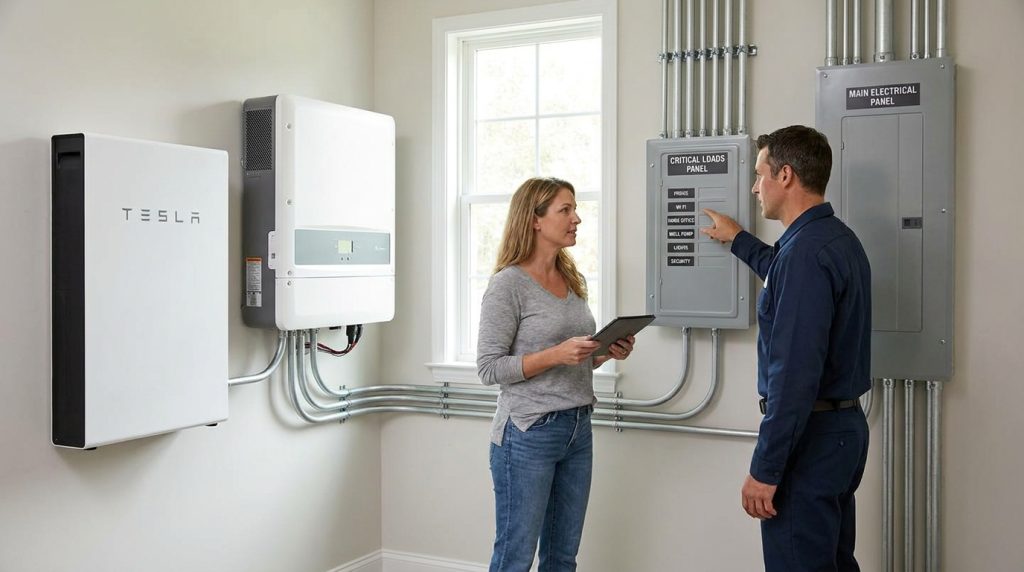
Essential load batteries power only selected circuits during an outage, usually through a critical loads panel. They are best for keeping refrigeration, internet, medical devices, lights, and a few priority circuits running without paying for full whole-home backup.
In a partial-home backup setup, the battery does not feed every circuit in the house. It supports a shorter list of circuits that matter most when the grid goes down. These circuits are usually placed in a critical loads panel, sometimes called a backup load panel.
This approach is different from a full home battery plan. A full system may include larger batteries, higher inverter output, solar integration, monitoring, and more design choices. For the broader system view, start with this home storage basics guide.
Battery storage can also support outage resilience when paired with solar. The U.S. Department of Energy explains that solar-plus-storage can reserve battery power for outages and reduce reliance on backup grid power in the right setup.
Should you choose essential-load backup instead of whole-home backup?
Choose essential-load backup if your priority is keeping critical circuits alive at a lower cost. Choose whole-home backup only when you need normal grid-like comfort, higher inverter output, and enough battery capacity for large loads.
Whole-home backup is not automatically the premium choice. It works when the home genuinely needs large-load continuity. Essential-load backup is often the smarter budget choice when the goal is food protection, internet, water, lights, and basic safety.
| Choice | Best for | Main advantage | Main limit |
|---|---|---|---|
| Essential-load backup | Cost-conscious homeowners | Lower system size and simpler load plan | Only selected circuits run |
| Whole-home backup | Homes needing full comfort | More normal daily operation | Larger battery and inverter needs |
| Essential-load plus solar | Longer daytime outage support | Solar may recharge the battery | Still needs load limits |
| Whole-home plus solar | High comfort and longer backup | More complete resilience plan | Higher cost and design complexity |
A partial-home plan is also easier to control. If the battery only feeds critical circuits, you know where power is going during an outage. For a deeper side-by-side decision, read the whole-home comparison.
The Department of Energy notes that solar and storage can support resilience, but system size affects what can be powered. That makes circuit selection just as important as battery capacity.
Which circuits should stay live first during an outage?

Start with circuits that protect food, health, water, communication, and basic safety. Add comfort loads only after those needs are covered, because every extra circuit reduces runtime or increases battery and inverter requirements.
The first circuits should support safety and basic living needs. A refrigerator or freezer protects food. A medical outlet may protect health. Internet keeps communication open. Well pumps, sump pumps, lights, and one comfort zone come next based on the home.
Priority 1: food, health, and communication
| Circuit | Priority | Why it matters | Decision |
|---|---|---|---|
| Refrigerator or fridge/freezer | 1 | Protects food during long outages | Keep |
| Medical device outlet | 1 | Supports health needs | Keep if used |
| Router and modem | 1 | Keeps communication working | Keep |
| Phone and laptop charging outlet | 1 | Supports alerts and basic work | Keep |
A medical priority home should treat the medical outlet as the first backed-up circuit. If medicine needs refrigeration, the fridge also becomes part of the health plan. Label that circuit clearly so nobody turns it off by mistake.
A work-from-home household may also need one office outlet. Add it after food, health, and safety needs are covered. The office circuit is useful, but it should not crowd out the refrigerator, medical outlet, or basic lighting.
Priority 2: water, lights, and one comfort zone
| Circuit | Priority | Why it matters | Decision |
|---|---|---|---|
| Well pump | 2 | Keeps water available in rural homes | Keep if required |
| Sump pump | 2 | Helps prevent flooding | Keep if risk exists |
| Bedroom or hallway lights | 2 | Improves safety at night | Keep |
| Kitchen task outlet | 3 | Supports small appliances | Add carefully |
| Gas furnace blower or one efficient HVAC zone | 4 | Adds basic comfort | Add only after load check |
A rural water-dependent home should place the well pump above comfort outlets. Water access matters more than a microwave or extra room outlets. If the home has a sump pump, treat it the same way during storm season.
The Department of Energy’s solar and resilience basics explain that backup planning depends on how the system is configured during outages. That is why the circuit list must match real household needs, not a generic template.
Which circuits should usually stay off the battery?
Leave high-demand comfort loads off the essential panel unless the system is intentionally sized for them. Electric cooking, dryers, large water heaters, EV charging, and central HVAC can shorten runtime fast or exceed inverter output.
Do not put every convenient outlet in the essential-loads panel. A smaller, cleaner circuit list usually gives better outage performance than a crowded panel that drains the battery quickly. This is where cost-conscious planning matters most.
| If the circuit is… | Usual decision | Why |
|---|---|---|
| Electric range or oven | Skip | High power draw and short backup value |
| Clothes dryer | Skip | Large load with low outage priority |
| Large electric water heater | Skip or isolate | Can drain battery quickly |
| EV charger | Skip | Better handled by a larger system plan |
| Central AC | Skip by default | High running and startup load |
| One mini-split or HVAC zone | Consider | Only if inverter and battery support it |
| Microwave | Optional | Useful, but not essential |
| Extra living room outlets | Limit | Easy to overload the backup plan |
One HVAC zone can be reasonable, but central AC should not be treated as essential by default. It belongs in the backup plan only after the installer checks inverter surge, continuous output, and expected runtime.
If you want to add motors, pumps, compressors, or HVAC equipment, review the inverter load limits before finalizing the panel. The inverter must handle both running power and startup demand.
How do kWh and kW change your essential-load choices?
Battery capacity in kWh tells you how long your selected loads can run. Inverter power in kW tells you which loads can run at the same time, including startup surge from pumps, compressors, and HVAC equipment.
Think of kWh as the fuel tank and kW as the size of the engine. A battery may have enough stored energy for hours of small loads, but the inverter still limits how much power can run at once. Motor loads can also need extra startup power.
Simple runtime estimate
A basic estimate starts with average load and battery capacity:
| Example load group | Estimated average load | Backup target | Energy needed |
|---|---|---|---|
| Fridge, router, lights, phone charging | 500 W | 10 hours | 5 kWh |
| Add well pump cycles | 800 W average | 10 hours | 8 kWh |
| Add comfort zone | 1,500 W average | 8 hours | 12 kWh |
This is only a planning example, not a final design. Real appliances cycle on and off, and pumps or compressors may spike during startup. A qualified installer should confirm circuit loads, inverter output, surge capacity, and battery size.
A storm-night basics plan might include the fridge, router, two lighting circuits, phone charging, and one kitchen outlet. If runtime matters more, skip the microwave. For deeper sizing work, use a full backup sizing method.
The Department of Energy’s Solar-Plus-Storage 101 explains that storage planning depends on both how much energy is stored and how it is delivered over time.
What does a load-shedding panel or critical loads panel actually do?
A critical loads panel separates the circuits you want backed up from the rest of the home. During an outage, the battery and inverter feed only those selected circuits. The main panel still holds the rest of the house loads.
This setup keeps the battery from trying to power everything at once. It also gives the homeowner a cleaner way to manage backup power. The electrician moves selected circuits into the backup load panel and labels them by purpose.
Load shedding means optional loads can be turned off manually or automatically when the system needs to protect runtime. This helps prevent overload and protects the battery from being drained by low-priority loads.
Before wiring, ask the installer to confirm:
- Which circuits move to the backup panel
- Which loads stay in the main panel
- How transfer equipment works during an outage
- Which circuits can be shed first
- How each backed-up circuit will be labeled
- Whether permits and inspection are required
- Whether the layout supports later expansion
If the home already has solar, storage may require extra planning around the inverter, transfer equipment, and panel layout. Use this retrofit wiring planning guide when an existing PV system is part of the project.
OSHA’s battery installation guidance is written for workplace settings, but it shows why battery systems should be treated as electrical safety equipment. For a home, that means using a qualified electrician and following local code requirements.
What is a practical 12-circuit essential-loads panel layout?
A good 12-circuit layout should protect health, food, water, communication, lighting, and one comfort need. It should not become a second main panel. The goal is a clean backup panel that is easy to understand during an outage.
Use this as a planning example, not a wiring instruction. Your electrician should adjust the final layout based on your actual panel, appliance ratings, local code, and inverter limits.
Sample 12-circuit layout
| Circuit | Load name | Priority | Why it belongs | Electrician note |
|---|---|---|---|---|
| 1 | Refrigerator or fridge/freezer | 1 | Protects food and medicine | Label clearly |
| 2 | Medical outlet | 1 | Supports health devices | Use dedicated label |
| 3 | Router and modem | 1 | Keeps internet active | Include network gear |
| 4 | Bedroom lights | 2 | Improves night safety | Use efficient bulbs |
| 5 | Hallway and bathroom lights | 2 | Helps safe movement | Keep load small |
| 6 | Phone and laptop charging outlet | 2 | Supports alerts and work | Avoid space heaters |
| 7 | Kitchen small outlet | 3 | Supports basic food prep | No high-power appliances |
| 8 | Well pump or sump pump | 2 | Protects water access or flooding risk | Check surge load |
| 9 | Gas furnace blower | 4 | Gives basic heat if fuel is available | Confirm startup load |
| 10 | One office outlet | 4 | Supports remote work | Keep devices modest |
| 11 | Garage door opener or security circuit | 4 | Supports access and safety | Optional |
| 12 | Spare future circuit | 5 | Allows later expansion | Do not fill too early |
This panel layout works for several real situations. A rural home may choose the well pump over the office outlet. A medical priority home may use a dedicated medical circuit and medicine refrigerator. A work-from-home home may keep internet and one office outlet, but only after food and safety loads are covered.
Leave one spare position if the panel and code allow it. That small choice can save money later because the installer has room to adjust the system without rebuilding the whole backup layout.
What should you ask your electrician before wiring essential circuits?
Before wiring essential circuits, ask the installer to confirm the circuit list, inverter output, surge loads, transfer equipment, panel labeling, permits, inspection requirements, and whether the backup panel leaves room for future battery or circuit expansion.
The best question is not “Can this battery run my house?” Ask, “Which exact circuits will this system run, for how long, and under what load limits?” That keeps the conversation practical.
Use this checklist before approving the design:
- Which circuits are backed up?
- Which circuits are excluded?
- What is the inverter’s continuous output?
- What surge loads are expected?
- Will the well pump, sump pump, or HVAC zone start reliably?
- How will load shedding work?
- What happens if too many loads run at once?
- Will every backed-up circuit be labeled?
- Are permits and inspection included?
- Can the system expand later?
This is also where the installer should explain tradeoffs. If you add a comfort load, something else may need to come off the list. If the battery is small, the circuit list must stay tight.
The Department of Energy’s road to resilience explains that storage can be scalable during an outage based on system size. That makes the design conversation more important than the product label.
Can you expand from essential loads to more circuits later?
You can often expand a partial-home backup system later, but only if the battery, inverter, transfer equipment, and panel layout were planned for growth. Add capacity first, then add circuits carefully.
Starting with partial backup is not a dead end. It can be a smart first step if the system is designed with spare panel space, compatible batteries, and inverter capacity that supports future plans.
Do not add circuits just because there is an empty breaker space. Add them only after checking runtime, inverter output, and startup loads. More circuits can make the system feel larger, but they can also make outages harder to manage.
A good upgrade path starts with the essentials, then adds battery capacity, then adds selected circuits. If solar will recharge the battery, plan that path early. For a wider system view, use this hybrid solar battery single system guide.
What to Do Next
Essential load batteries work best when the circuit list is short, clear, and based on real outage needs. Start by writing down the loads you cannot lose: food, health, water, communication, safe lighting, and one comfort circuit if it truly fits.
Then mark every high-demand load that should stay off the backup panel. Bring both lists to a qualified electrician and ask for a circuit-by-circuit plan. A clean essential-load layout can save money now and leave a better path for expansion later.
Frequently Asked Questions
How do I know whether partial or whole-home backup is right for my home?
Choose partial-home backup if you only need critical circuits during outages. Choose whole-home backup if you need large loads, full comfort, or normal grid-like operation. Partial backup usually fits budget-focused homes better.
What determines how long a battery will run?
Runtime depends on battery capacity, the watts used by backed-up circuits, and whether solar can recharge the battery. Fewer circuits usually mean longer runtime. High-demand loads reduce runtime quickly.
Does adding solar change battery configuration?
Yes, solar can recharge the battery during daylight, so it may change runtime planning and battery size. The backed-up circuit list still needs realistic load limits. Solar helps most when the loads are controlled.
Can partial backup be expanded later?
Often, yes, but only if the inverter, battery system, transfer equipment, and panel layout support expansion. Plan spare capacity before adding more circuits. Expansion should follow the system’s load limits.
Why are whole-home setups more complex?
Whole-home systems must support higher electrical loads across more circuits. They usually need larger batteries, higher inverter output, more load management, and more detailed electrical planning. That is why they cost more.
What is more important: battery capacity or power rating?
Both matter. Battery capacity affects runtime, and power rating controls what can run at the same time. Pumps, compressors, and HVAC equipment also need startup power, so the inverter must be checked carefully.

-

 OEM Residential Energy Storage Solutions: Passive vs. Active Cell Balancing
2026-09-30
-
 Smart Home Battery with BMS Communication: Cybersecurity and BMS Safety
 -
 10kWh Home Battery Backup System: Is 90% DoD Better for Daily Solar Storage?
2026-09-29
-
 Integrated Home Energy Storage System 150–430V MPPT Design
2026-09-28
-
 LiFePO₄ Residential Backup Battery SOC Accuracy in Parallel Systems
Share this:





.svg)






-899.svg)


