




Backup Power Battery: Choosing the Right kWh Tier
A backup power battery system for home should be sized by outage length and essential loads, not house size alone. Use 5 kWh for short brownouts, 10 kWh for a careful 24-hour storm plan, and 20 kWh for multi-day essential backup. For 72-hour events, strict load control and solar or generator recharge matter more than capacity alone.
How many kWh do you need for a home backup battery?
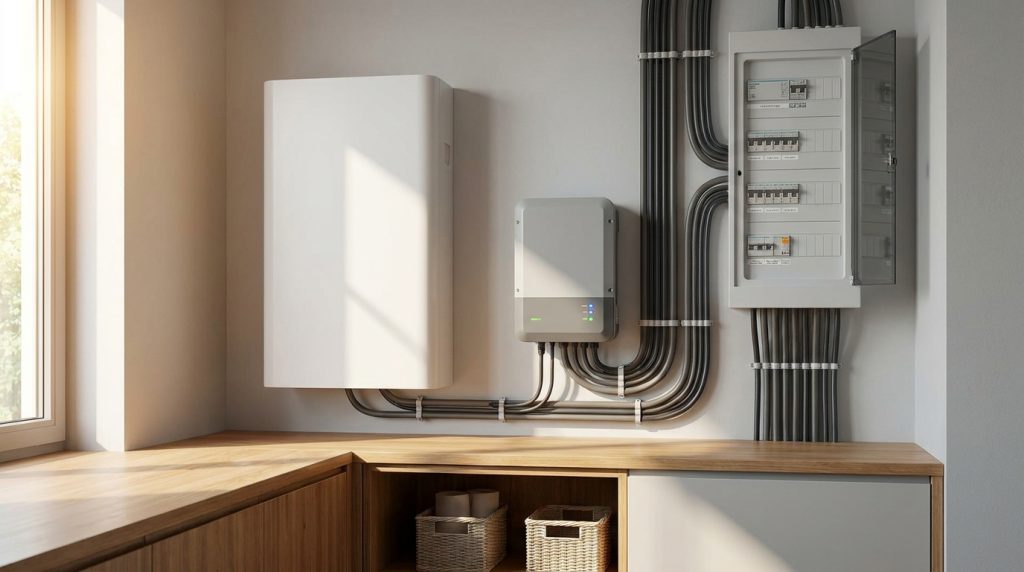
A home backup battery should usually be sized by outage duration and essential loads. Use 5 kWh for short brownouts, 10 kWh for a 24-hour essential-load plan, and 20 kWh for longer outages with strict load control.
The right tier depends on what you want to keep running during an outage. A battery does not power a home for a fixed number of hours by itself. Runtime changes based on your average watt load, usable capacity, and whether you back up the whole home or only selected circuits.
| Outage scenario | Recommended starting tier | Best fit | What to avoid |
|---|---|---|---|
| 4-hour brownout | 5 kWh | Refrigerator, Wi-Fi, lights, phones, laptop, small fan | Central AC, electric heat, water heating, heavy cooking |
| 24-hour storm outage | 10 kWh | Essential loads with careful use | Normal whole-home usage |
| 72-hour grid event | 20 kWh | Multi-day essential backup with strict load control | Running the house as usual for three days |
For broader system planning, use this article as the kWh decision layer, then compare it with a complete home energy storage guide.
What should you power first during an outage?
Power essentials first: refrigeration, Wi-Fi, lights, phone charging, medical devices, and selected pumps. Avoid heavy heating, cooling, and water-heating loads during long outages unless the system is sized and wired for them.
The goal is not to run every appliance at once. The goal is to keep food safe, communication online, basic lighting available, and critical home systems working. This is why an essential-load plan can often deliver better outage protection than a larger battery used without discipline.
| Load type | Examples | Priority | Backup advice |
|---|---|---|---|
| Critical essentials | Refrigerator, router, phone charging, LED lights, medical devices | High | Include these first in the backup plan. |
| Safety and home protection | Sump pump, well pump, garage access, security system | High when needed | Check running wattage and startup surge before sizing. |
| Comfort loads | Fans, laptop, TV, small kitchen devices | Medium | Use selectively during longer outages. |
| Heavy loads | Central AC, electric heat, electric water heater, oven | Low for long outages | Avoid unless the system is designed for these loads. |
If the home will use a dedicated critical-load panel, the next planning step is to define the essential load circuits that the battery should support.
What does a 5 kWh battery handle during a 4-hour brownout?
A 5 kWh battery is best for short brownouts and light essential loads. It can cover a few critical circuits for several hours, but it should not be treated as a whole-home backup system.
This tier fits homeowners who mainly want protection from brief outages. A realistic plan may include a refrigerator, Wi-Fi router, several LED lights, phone charging, a laptop, and a small fan. The battery works best when the load list is narrow and predictable.
A 5 kWh tier becomes weak when the homeowner expects normal living during an outage. If you add electric cooking, central AC, water heating, or multiple large appliances, the runtime can drop quickly. For short brownouts, the smarter strategy is to protect essentials, not comfort loads.
Is 10 kWh enough for a 24-hour storm outage?
A 10 kWh battery can work for a 24-hour storm outage when it supports essential loads only. It becomes too small if the homeowner expects normal HVAC, electric cooking, or high-power water heating.
This tier is often the practical middle ground. It gives more breathing room than 5 kWh and can support a careful one-day outage plan. The homeowner still needs to manage loads, especially if the outage happens during extreme heat, cold, or a high-use evening period.
- Prioritize refrigeration, lights, router, phone charging, and safety loads.
- Use fans, laptops, and small devices only when needed.
- Avoid central AC, electric heat, and electric water heating.
- Check whether any pump or motor load has a high startup surge.
- Ask for usable kWh, not only nameplate battery size.
Can 20 kWh cover a 72-hour grid event?
A 20 kWh battery can support a 72-hour essential-load plan only with disciplined use. It should be paired with solar recharge or another charging strategy if the homeowner wants stronger multi-day resilience.
This tier is best understood as a resilience tier. It can support longer outages when the home runs only critical loads and avoids heavy appliances. It is not a promise that the house will operate normally for three days.
| 72-hour planning choice | What it means | Risk level |
|---|---|---|
| Essentials only | Refrigerator, router, lights, phones, selected pump, limited fan use | Lower |
| Essentials plus comfort | Adds laptop, TV, more lighting, and small devices | Medium |
| Normal whole-home use | Includes HVAC, water heating, cooking, and large appliances | High |
For multi-day events, the stronger plan is 20 kWh plus strict load control. Solar recharge or generator support can improve confidence when the grid stays down longer than expected.
How do you calculate runtime from watts and kWh?
Estimate runtime by dividing usable battery energy by average load: usable kWh ÷ load kW = hours. A 1 kW load drains energy much faster than a 250 W essential-load plan.
Use average load for runtime planning. Peak surge still matters because motors and pumps may need extra power when they start, but runtime is mostly controlled by how many watts the home uses over time.
| Average load | 5 kWh tier | 10 kWh tier | 20 kWh tier | Planning note |
|---|---|---|---|---|
| 250 W | About 20 hours | About 40 hours | About 80 hours | Light essential-load plan |
| 500 W | About 10 hours | About 20 hours | About 40 hours | Moderate essential-load plan |
| 1,000 W | About 5 hours | About 10 hours | About 20 hours | Higher household load |
| 2,000 W | About 2.5 hours | About 5 hours | About 10 hours | Heavy use, shorter runtime |
This table is for planning only. Final runtime should be based on product-specific usable kWh, inverter output, backup circuit design, and the real appliances connected to the system.
Should you choose whole-home backup or essential-load backup?
Whole-home backup is convenient, but it is not always the better choice. It works when the budget, battery capacity, and load management are strong. Essential-load backup is usually safer when the goal is longer runtime during storms or grid events.
A whole-home system can include more circuits, but it may drain the battery faster if heavy loads are not controlled. An essential-load system is more focused. It protects the circuits that matter most and avoids wasting stored energy on loads that are not urgent.
| Backup approach | Best for | Main advantage | Main caution |
|---|---|---|---|
| Essential-load backup | Longer runtime and lower waste | Keeps critical circuits running longer | Does not power every circuit |
| Whole-home backup | Comfort and convenience | Can support more of the home | Needs more capacity and load control |
If you are unsure which route fits your home, compare whole-home or partial backup before finalizing the battery tier.
Does solar or grid charging change the kWh tier?
Solar can extend backup runtime, but only if the system is designed to provide outage power. Grid charging helps before the outage, while solar or generator charging matters more during multi-day events.
A battery charged from the grid can provide standby backup when the grid fails. That helps with short outages and storm preparation. During a long outage, the battery needs a way to recharge if the homeowner expects more than the stored energy can provide.
- Grid charging helps prepare the battery before an outage.
- Solar recharge can extend runtime during daylight if backup operation is supported.
- Generator integration can help during longer grid events.
- Solar alone should not be assumed to work during outages unless the system is designed for backup power.
This is why the kWh tier still matters. Solar can improve resilience, but it does not remove the need to size the battery around essential loads and outage goals.
What specs matter after you choose the kWh tier?
Nameplate kWh is not enough to choose a system. Usable capacity, continuous output, surge output, and backup circuit design can matter more than a bigger number on the product page.
After choosing the starting tier, review the system as a complete backup solution. The battery must have enough usable energy, enough power output, and the right backup wiring method for the loads you expect to run.
- Usable capacity: The energy you can actually use during an outage.
- Continuous output: The power the system can supply steadily.
- Surge power: The extra power needed to start pumps, motors, and compressors.
- Battery chemistry: LiFePO4 is commonly used in home battery systems.
- Battery management system: The BMS helps monitor and protect the battery.
- Backup interface or transfer method: This determines how the home receives backup power.
- Safety and permits: Ask about UL 9540, UL 9540A, NFPA 855, local code, and installer qualifications.
If the quote includes a critical-load panel or transfer equipment, ask the installer to explain the backup wiring basics in plain language before installation.
What should you check before requesting a quote?
Before requesting a quote, define the outage you are planning for. Pick a target first: a 4-hour brownout, a 24-hour storm outage, or a 72-hour grid event. Then list the loads you want to keep running and match them to a starting tier.
- Choose your outage target: 4 hours, 24 hours, or 72 hours.
- List essential loads first.
- Decide whether you want essential-load or whole-home backup.
- Choose a starting tier: 5 kWh, 10 kWh, or 20 kWh.
- Ask for usable kWh, not just nameplate kWh.
- Confirm continuous output and surge output.
- Ask which circuits will receive backup power.
- Check whether solar or generator charging can be added.
- Confirm local permits, safety standards, and installation requirements.
The best quote is not always the largest battery. It is the system that matches your outage target, protects the right loads, and gives you a clear path to expand if your backup needs grow.
FAQs
How long can a home backup battery last during an outage?
A home backup battery can last a few hours to several days depending on usable kWh and load. A small essential-load plan may stretch runtime, while HVAC, electric heat, and water heating can drain capacity quickly.
Can I have battery backup without solar?
Yes, a home battery can provide backup without solar if it charges from the grid before an outage. Solar becomes more useful during longer outages because it can recharge the battery when grid power is unavailable.
Are home batteries worth it without solar?
A home battery can be worth it without solar when the main goal is outage protection. It is usually less valuable for multi-day resilience unless the system can recharge from solar, generator power, or another source.
Can a battery backup run a well pump?
A battery backup can run a well pump only if the system supports the pump’s running wattage and startup surge. The installer should check pump specs before sizing the battery or assigning it to a backup circuit.
Is it OK to keep a home battery plugged in all the time?
Yes, many home battery systems are designed to stay connected for standby charging and monitoring. The safe answer depends on the manufacturer’s instructions, battery management system, ventilation, and installation requirements.
Is 10 kWh enough to run a house?
A 10 kWh battery is usually enough for selected essential loads, not normal whole-home living. It can support a careful 24-hour plan, but HVAC, electric cooking, and water heating may require much more capacity.

-

 OEM Residential Energy Storage Solutions: Passive vs. Active Cell Balancing
2026-09-30
-
 Smart Home Battery with BMS Communication: Cybersecurity and BMS Safety
 -
 10kWh Home Battery Backup System: Is 90% DoD Better for Daily Solar Storage?
2026-09-29
-
 Integrated Home Energy Storage System 150–430V MPPT Design
2026-09-28
-
 LiFePO₄ Residential Backup Battery SOC Accuracy in Parallel Systems
Share this:





.svg)






-899.svg)


