




Home Emergency Power Storage: 72-Hour Plan Guide
Home emergency power storage should be sized from essential loads, not whole-house habits. For a 72-hour outage, prioritize medical devices, refrigeration, communications, lighting, internet or alarm equipment, then add each load’s watts × run hours ÷ 1,000. Use a cold-storage and medication worksheet, keep high-draw HVAC and EV loads off unless the system is designed for them, and confirm transfer wiring before storm season.
What should a 72-hour home emergency power plan actually keep running?
A 72-hour emergency plan should power essentials first: medical devices, refrigeration, communications, lighting, and alarm equipment. Size storage from those loads before considering comfort loads like HVAC, cooking, EV charging, or whole-home backup.
The goal is not to keep normal life running exactly the same. The goal is to protect safety, food, medicine, communication, and basic security until grid power returns or another plan begins.
- First priority: medical devices, refrigerated medicines, emergency phones, and basic lighting.
- Second priority: refrigerator, freezer, router, modem, alarm panel, and cellular gateway.
- Third priority: small fan, limited cooking device, laptop charging, and other low-power comfort loads.
- Usually defer: central HVAC, EV charging, laundry, electric water heating, and large cooking appliances.
For a broader overview of outage planning, use the outage protection basics guide. This article stays focused on the 72-hour emergency load plan.
How do you turn essential loads into kWh for 72 hours?
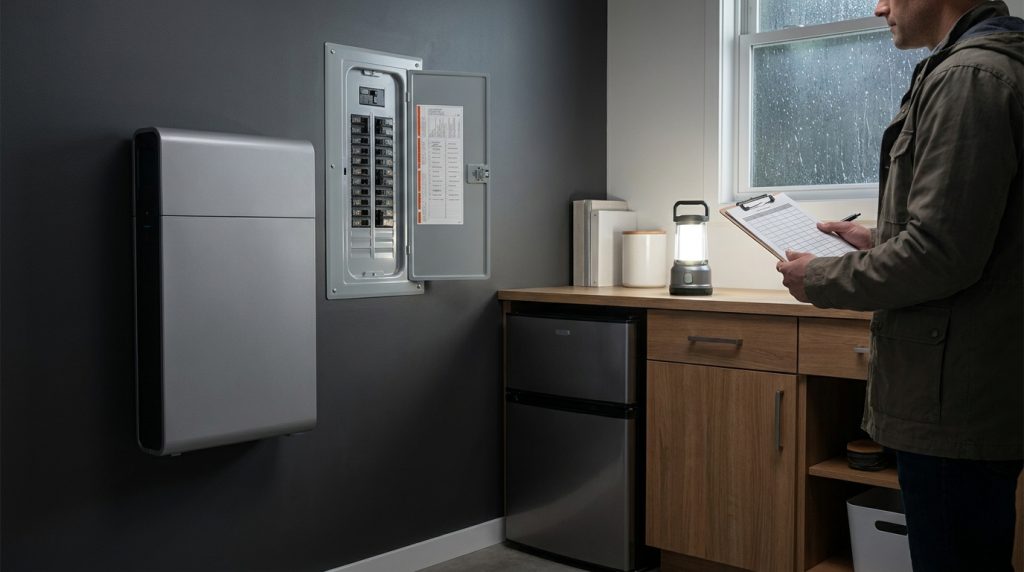
Estimate 72-hour storage by multiplying each essential load’s watts by expected run hours, then dividing by 1,000 to get kWh. Add the rows, then choose a battery tier that covers usable capacity, surge, and reserve.
The simple formula is:
Watts × run hours ÷ 1,000 = kWh
kW versus kWh in one minute
kW tells you how much power a system can deliver at one time. kWh tells you how much energy is stored. A system with enough kWh but weak output may not start certain appliances. A system with high kW but low kWh may run out too soon.
This is why a phrase like “10 kW battery” is incomplete. For emergency backup, you need both the output rating and the usable energy capacity.
72-hour essential-load worksheet
| Load | Priority tier | Watts | Hours per day | Days | kWh subtotal | Surge note | Outlet or circuit | Can defer? |
|---|---|---|---|---|---|---|---|---|
| Refrigerator | Food safety | Enter appliance watts | Enter expected runtime | 3 | Watts × hours × 3 ÷ 1,000 | Check startup surge | Kitchen circuit or backup outlet | No |
| Freezer | Food safety | Enter appliance watts | Enter expected runtime | 3 | Watts × hours × 3 ÷ 1,000 | Check startup surge | Freezer circuit or backup outlet | Usually no |
| Medical device | Life safety | Enter device watts | Enter required runtime | 3 | Watts × hours × 3 ÷ 1,000 | Ask provider or manufacturer | Dedicated backup outlet | No |
| Router or modem | Communication | Enter device watts | Enter required runtime | 3 | Watts × hours × 3 ÷ 1,000 | Low surge | Backup outlet | Maybe |
| LED lighting | Safety | Enter combined watts | Enter evening hours | 3 | Watts × hours × 3 ÷ 1,000 | Low surge | Selected room circuit | No |
| Alarm panel or gateway | Security | Enter device watts | Enter required runtime | 3 | Watts × hours × 3 ÷ 1,000 | Check panel battery | Alarm circuit or outlet | No |
| Small fan | Comfort | Enter fan watts | Enter limited runtime | 3 | Watts × hours × 3 ÷ 1,000 | Check motor surge | Backup outlet | Yes |
After the worksheet total is complete, compare it with practical battery kWh tiers. Do not choose battery capacity from nameplate size alone. Leave room for usable capacity, inverter losses, startup surge, and reserve.
Which loads get priority during the first 72 hours?
Priority order matters because every extra load shortens runtime. Start with life safety, then food and medicine protection, then communications, lighting, and security. Comfort loads come last unless the system is sized specifically for them.
| Priority | Load type | Examples | Decision rule |
|---|---|---|---|
| Tier 1 | Life safety and medical | CPAP, oxygen equipment, suction device, wheelchair charger, home dialysis support | Power first and confirm backup requirements before storm season. |
| Tier 2 | Food, medicine, and communication | Refrigerator, freezer, medicine storage, router, modem, phone charging | Keep only what protects health, food, and emergency contact. |
| Tier 3 | Basic safety and security | LED lights, alarm panel, cellular gateway, security router | Keep low-power items that support movement, alerts, and home security. |
| Tier 4 | Limited comfort | Small fan, laptop, small cooking device | Add only after the first three tiers are covered. |
| Defer | High-draw loads | Central HVAC, EV charging, laundry, electric water heating, large cooking appliances | Leave off unless the system is designed and sized for them. |
The HHS/ASPR emergency power planning resource highlights the need to plan for electricity-dependent medical devices. That makes medical runtime a separate planning item, not just another appliance row.
How should you protect refrigerators, freezers, and refrigerated medicines?
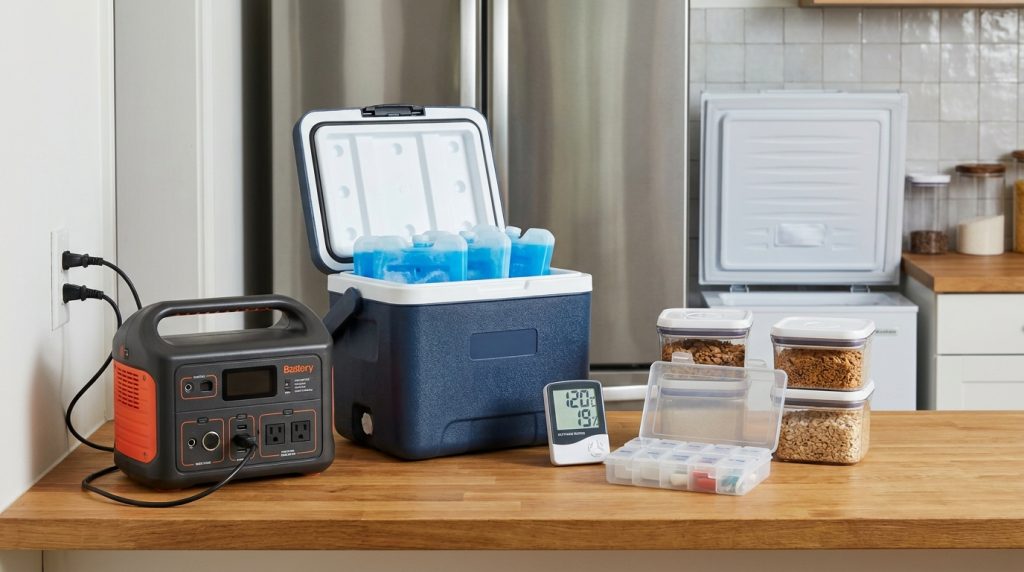
Protect cold storage by pairing battery runtime with food-safety timing. Keep refrigerator and freezer doors closed, monitor temperature, prepare coolers and ice packs, and give refrigerated medicines their own backup line instead of treating them like normal groceries.
FoodSafety.gov states that a refrigerator keeps food safe for about 4 hours during a power outage if the door stays closed. A full freezer can hold temperature about 48 hours, while a half-full freezer can hold temperature about 24 hours.
The CDC also recommends planning with thermometers, coolers, frozen gel packs, and ice. This matters because battery backup and cold-storage behavior work together. A battery does not replace safe food handling.
Cold-storage-and-meds priority worksheet
| Item | Temperature concern | Backup action | Action at 4 hours | Action at 24 hours | Action at 48 hours | Action at 72 hours |
|---|---|---|---|---|---|---|
| Refrigerator | Food warms when power is off | Add to kWh worksheet | Keep door closed and check thermometer | Move priority food if needed | Discard unsafe food if temperature rules require it | Use only verified safe food |
| Freezer | Frozen food may thaw | Keep full if possible and add to worksheet | Keep door closed | Check half-full freezer timing | Check full freezer timing | Discard unsafe items if needed |
| Refrigerated medicines | Medicine may require controlled temperature | Use a dedicated backup line and cooler plan | Check storage temperature | Contact provider if temperature is uncertain | Follow provider guidance | Do not guess if safety is uncertain |
| Cooler and ice packs | Backup cold storage may be needed | Prepare before storm season | Use only if needed | Refresh ice if possible | Use for priority items | Plan refill or evacuation option |
| Thermometer | Temperature must be verified | Place in fridge, freezer, or medicine storage | Check before opening often | Record temperatures | Use readings for food decisions | Use readings for final safety decision |
Do not make refrigerated medicine compete with snacks, drinks, or comfort loads. Put medicine storage in its own worksheet row, confirm the device wattage, and keep provider contact information available.
What is the alarm-system battery hand-off plan during an outage?
An alarm handoff plan confirms what powers the panel, router, cellular gateway, and sensors after grid power fails. The safest approach is to test the system before storm season and document which backup outlet or circuit supports each device.
Many homeowners assume the alarm will keep working because the panel has a standby battery. That may not cover every part of the system. The router, modem, cellular communicator, smart hub, keypad, and app alerts may also depend on power.
- Find the alarm panel, transformer, standby battery, router, modem, and cellular gateway.
- Ask the alarm provider how long the panel battery is expected to last.
- Decide whether the backup system powers the alarm circuit, the router, the gateway, or all three.
- Test the handoff before storm season.
- Write down the backup outlet or circuit for each alarm-related device.
If the alarm is part of an installed backup design, connect this planning to critical-load wiring. That helps avoid unsafe extension-cord work during an outage.
Should you use portable power stations, a home battery, or critical-load wiring?
Portable power stations are simplest for small plug-in loads, but critical-load wiring or a home battery is better for repeatable 72-hour emergency planning. Choose the architecture after the load worksheet, not before it.
A small portable station may be enough for phones, router, lights, and a short appliance run. A larger home battery with essential backup circuits is usually better when refrigeration, medical equipment, alarm continuity, and repeatable handoff matter.
| Option | Best fit | Strength | Limit |
|---|---|---|---|
| Portable power station | Phones, router, lights, small devices, limited fridge support | Simple and movable | Manual setup and limited circuit integration |
| Installed home battery | Repeatable essential-load backup | Cleaner handoff and larger capacity options | Needs proper design and installation |
| Critical-load wiring | Selected circuits like fridge, lights, router, alarm, and medical outlet | Controls runtime by excluding wasteful loads | Requires professional planning and code-aware work |
| Whole-home backup | Large homes with bigger budget and designed capacity | More convenience | Can drain storage quickly if loads are not managed |
The EPA battery energy storage safety resource points to safety resources including UL 9540 and UL 9540A references. For installed systems, safety and compatibility should be part of the buying decision.
What changes if you have solar, no solar, or grid-only charging?
Solar can help during a long outage, but it is not automatically a backup plan. A solar array may shut down during a grid outage unless the system is designed with compatible battery, inverter, and transfer equipment.
No-solar backup can still work if the battery is fully charged before the storm. The difference is that a grid-only user needs a pre-storm charging routine and a more conservative load plan. For a deeper no-solar path, use the backup without solar guide.
| Setup | What changes during outage planning? | Best action |
|---|---|---|
| Solar plus battery | May recharge during outage if designed for backup operation | Confirm islanding, inverter compatibility, and poor-weather expectations. |
| Battery without solar | Runtime depends on stored energy before the outage | Charge before storm season and keep essential loads tight. |
| Grid-only charging | No recharge if the outage continues | Use a stricter 72-hour worksheet and avoid high-draw loads. |
| Portable station with solar panels | Recharge depends on panel wattage, sun hours, weather, and input limits | Treat solar recharge as reserve unless sized for poor weather. |
What safety and installation checks matter before storm season?
Emergency backup should be safe before it is convenient. Proper transfer equipment, battery placement, local requirements, manufacturer instructions, and weather-safe operation matter more during a storm than a rushed last-minute setup.
Use safe backup wiring when selected circuits are part of the design. Avoid unsafe backfeeding, overloaded extension cords, wet connections, or placing equipment where it cannot be accessed safely.
- Confirm transfer equipment and installation requirements before connecting home circuits.
- Check manufacturer instructions for placement, ventilation, temperature, and clearance.
- Keep electrical connections dry and protected from storm exposure.
- Confirm battery safety certifications and installation compatibility.
- Test the backup process before storm season.
- If a fuel generator is used alongside batteries, keep it outdoors and away from enclosed spaces.
Safety checks should happen before the outage, not during it. A calm pre-storm test is easier than trying to find the correct cable, breaker, outlet, or alarm power source in the dark.
What should you prepare before requesting a quote?
Before requesting a quote, prepare a load worksheet, a critical circuit list, a refrigeration and medicine plan, and an alarm-system handoff note. This helps the installer or supplier size the system around real emergency needs instead of guessing.
- Completed 72-hour kWh worksheet
- List of essential loads and deferred loads
- Refrigerator, freezer, and refrigerated medicine plan
- Medical-device power requirements
- Alarm panel, router, modem, and gateway handoff note
- Solar, no-solar, or grid-only charging preference
- Preferred circuits or backup outlets
- Questions about incentives, documentation, and installation requirements
The IRS residential clean energy credit page states that qualified battery storage technology must have capacity of at least 3 kWh. Ask your installer or tax professional what documentation is needed before making a purchase decision.
After the worksheet is complete, use it to choose capacity tiers. The best quote request is not “How big of a battery do I need?” It is “Here are my essential loads for 72 hours. What battery and transfer design supports them safely?”
Practical 72-hour scenarios
Storm-belt family plan
A storm-belt homeowner may prioritize the refrigerator, freezer, router, phone charging, LED lighting, alarm panel, and one small fan. HVAC, EV charging, laundry, and electric water heating stay off unless the backup system is designed for those loads.
Refrigerated medicine plan
A household with refrigerated medicine should use a thermometer, cooler, gel packs, provider contact, and a dedicated backup outlet. Medicine storage should have its own worksheet row because it may have different temperature and safety requirements than food.
Medical-device household
A home using a CPAP, oxygen equipment, power wheelchair charger, suction device, or home dialysis support should treat medical power as the first priority. The device wattage, required runtime, provider guidance, and evacuation threshold should be documented before storm season.
Alarm handoff test
The homeowner should test the alarm panel battery, router, cellular gateway, app alerts, and siren behavior before a real outage. The test should confirm which backup outlet or circuit supports each security device.
Portable versus installed backup
A portable power station may support phones, router, and lights. A larger installed battery with critical-load wiring is better when the plan includes refrigerator, freezer, medical equipment, alarm continuity, and a repeatable 72-hour backup process.
FAQ
How Long Does a Battery Backup Last When the Power Goes Out?
A battery backup lasts as long as its usable kWh can support the connected loads. A small load list may run much longer than a whole-home load list, so calculate watts × run hours before choosing capacity.
How Long Will a 10kW Battery Power a House?
A “10 kW battery” is an incomplete sizing phrase because kW measures power output, while kWh measures stored energy. To estimate runtime, confirm the battery’s kWh capacity and divide usable energy by your essential-load demand.
Can I Run My Home off Solar Battery if the Power Goes Down?
Yes, but only if the system is designed for backup operation during outages. A solar array alone may shut down for safety unless it is connected to compatible battery, inverter, and transfer equipment.
How to Power House During Power Outage?
Start by powering essential loads, not the whole house. Use a battery system, portable power station, or properly wired backup circuit plan to support refrigeration, medical devices, phones, lights, router, and alarm equipment first.
What Are The Different Types Of Emergency Power Supply?
Common emergency power options include portable power stations, installed home batteries, solar-plus-battery systems, and fuel generators. For indoor battery backup, focus on usable kWh, output rating, transfer method, safety certification, and which loads it can support.
How long does it take to recharge a portable power station with solar panels?
Recharge time depends on the station’s battery size, solar input limit, panel wattage, weather, and sun hours. Treat solar recharge as helpful reserve, not guaranteed 72-hour runtime, unless the system is sized for poor-weather conditions.
Are portable power stations weather-resistant?
Some portable power stations have rugged cases, but the article should not assume outdoor storm exposure is safe. Always follow the manufacturer’s rating, keep electrical connections dry, and use weather-safe placement.

-

 OEM Residential Energy Storage Solutions: Passive vs. Active Cell Balancing
2026-09-30
-
 Smart Home Battery with BMS Communication: Cybersecurity and BMS Safety
 -
 10kWh Home Battery Backup System: Is 90% DoD Better for Daily Solar Storage?
2026-09-29
-
 Integrated Home Energy Storage System 150–430V MPPT Design
2026-09-28
-
 LiFePO₄ Residential Backup Battery SOC Accuracy in Parallel Systems
Share this:





.svg)






-899.svg)


