




All-in-One Energy Storage: Cabinet vs Split Stack
An all in one energy storage system is usually better when speed, compact footprint, single-vendor support, and clean residential installation matter most. A split battery and inverter stack is better when the project needs custom inverter features, easier component replacement, generator integration, or more brand flexibility. Compare total installed cost per usable kWh, not battery price alone.
A cabinet quote and a split-stack quote can look similar at first glance. Both may show 10 kWh of battery storage, solar support, backup power, and smart monitoring. The real difference appears during installation, service calls, expansion planning, and final installed cost. This guide compares both setups in a practical way, so installers can choose better inventory and homeowners can review two quotes with more confidence.
What is the real difference between an all-in-one cabinet and a split stack?
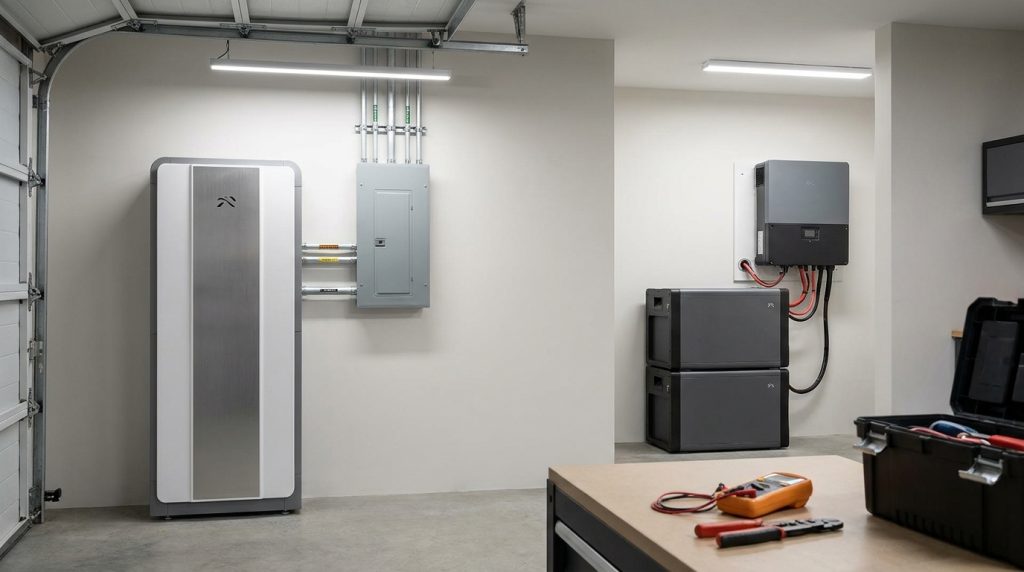
An all-in-one energy storage system places the battery, inverter, controls, and protection inside one coordinated cabinet. A split stack uses separate battery and inverter hardware, giving more component choice but adding wiring, compatibility, and commissioning steps.
A single-cabinet ESS usually includes battery modules, a hybrid inverter or PCS, BMS, EMS, protection devices, thermal controls, and monitoring in one enclosure. For a wider background on system types, see this home ESS guide.
A split stack separates the battery and inverter. The installer may also add a gateway, combiner, backup panel, disconnects, and separate monitoring setup. This can work well, but the quote must match usable kWh, inverter power, supported loads, and expansion plan.
| Item to compare | All-in-one cabinet | Split battery and inverter stack |
|---|---|---|
| Main layout | One integrated cabinet | Separate battery and inverter |
| Wiring | Less field wiring | More field wiring |
| Support path | Usually one supplier | May involve two or more brands |
| Flexibility | Strong inside one ecosystem | More component choice |
| Quote risk | Cabinet price may look higher | Hardware may look cheaper, labor may rise |
What the inverter does in both designs
The inverter converts battery DC power into AC power for home loads. In a solar setup, a hybrid inverter can also manage solar charging, grid charging, backup mode, and export rules. For a deeper component overview, read the all-in-one ESS basics.
Which system is faster to install?
All-in-one cabinets are usually faster to install because major components are factory-integrated and pre-tested. Split stacks can still work well, but they add more on-site wiring, inverter-battery communication checks, and layout decisions.
For repeat residential jobs, the cabinet design often saves time because the installer works with a known layout. The main tasks become placement, protection, AC connection, backup-panel setup, commissioning, and monitoring. That matters when labor rates are high or the installer wants a repeatable process.
A split stack needs more design work on-site. The installer must plan the battery location, inverter location, cable path, communication link, protection devices, firmware settings, and system tests. For safety, energy storage systems should use quality products and properly licensed installers, as explained in this DOE solar and storage fire safety guide.
| Installation task | All-in-one cabinet | Split stack |
|---|---|---|
| Physical layout | Faster to plan | More layout choices |
| Battery-inverter wiring | Mostly integrated | Field-installed |
| Communication setup | Usually pre-matched | Must be checked |
| Commissioning | More repeatable | More variables |
| Best use case | Standard home backup | Custom projects |
For a full installation flow, link the labor discussion to ESS installation steps when the reader needs more detail.
How much space does each setup need?
A single-cabinet system usually wins on visual neatness and compact layout. A split stack can be better when the battery and inverter need different locations for weight, heat, service access, or existing wiring.
Footprint is not only about the cabinet size. It also includes service clearance, wall strength, cable routing, ventilation, weather rating, and backup-panel location. A tidy garage install can still fail as a design if the cabinet blocks service space or sits too far from required electrical equipment.
A split stack can spread components across better locations. For example, the inverter may sit near the main electrical panel, while the battery stack may go on a stronger wall or floor-mounted rack. That can help in some retrofits, even if the final setup looks less compact.
| Project condition | Better fit | Why |
|---|---|---|
| Small garage wall | All-in-one cabinet | Cleaner single footprint |
| Utility room with limited wall area | Split stack | Components can be separated |
| Outdoor cabinet plan | All-in-one cabinet | Fewer separate enclosures |
| Heavy battery placement issue | Split stack | Battery can move to safer support |
| Homeowner wants clean appearance | All-in-one cabinet | Less visible hardware |
Which design is easier to troubleshoot when something fails?
Split systems can make component-level replacement easier, but only when the installer can diagnose the inverter, battery, BMS, and communication link confidently. All-in-one systems simplify support ownership but may create stronger vendor dependency.
This is where many quotes hide the real tradeoff. A cabinet gives the homeowner one support path. If the system has a fault, the installer or supplier can usually treat it as one coordinated product. That can reduce finger-pointing, especially for homeowners who do not want to manage brands.
A split stack can be easier to repair at the component level. If the inverter fails, the installer may replace only the inverter. If a battery module fails, the battery side may be isolated. This only works well when the installer understands both systems and the brands support each other.
Common fault scenarios to compare
| Fault scenario | All-in-one cabinet | Split stack | What the buyer should ask |
|---|---|---|---|
| Inverter fault | One supplier support path | Inverter brand handles it | Who owns the warranty case? |
| Battery module fault | Cabinet ecosystem diagnosis | Battery supplier handles it | Can one module be replaced? |
| BMS communication issue | Factory-matched system may reduce mismatch | More protocol checks needed | Are inverter and battery approved together? |
| Monitoring problem | One app or platform | May involve separate platforms | Who fixes app and data issues? |
| Replacement part delay | Depends on cabinet supplier | Depends on each brand | What parts are stocked locally? |
A split stack is not automatically easier to service. It gives more parts-level control, but weak brand support can slow the repair. For battery terms and system basics, send readers to battery storage basics when the article is published.
Can both systems expand later?
Both systems can expand, but neither is automatically future-proof. All-in-one expansion is cleaner inside one brand ecosystem, while split-stack expansion gives more component choice but depends on inverter limits, BMS compatibility, and future approved battery lists.
Expansion needs a real check before the buyer signs. Ask whether the system can add another 5 kWh or 10 kWh later, how much it will cost, and whether the same battery model will still be available. Also check usable capacity, not only nameplate capacity.
The U.S. DOE notes that lithium-ion BESS technical requirements should be customized to the project. That matters here because expansion depends on the project’s inverter rating, battery design, controls, safety requirements, and installation limits. Use technical requirements early, not after the system is already installed, with help from this DOE lithium-ion BESS technical specification resource.
Expansion checklist:
- What is the maximum battery capacity supported?
- Does the inverter support the future load target?
- Are added modules from the same approved series?
- Does expansion require a new cabinet, gateway, or firmware update?
- What is the installed cost of adding 5 kWh or 10 kWh later?
For homeowners still deciding capacity, link this section to storage unit sizing.
What does a 10 kWh system really cost per kWh installed?

Compare 10 kWh quotes by dividing total installed cost by usable kWh, not nameplate kWh. A cheaper battery can become more expensive after inverter hardware, gateway parts, extra wiring, labor, commissioning, and permit scope are included.
The clean formula is simple: total installed cost divided by usable kWh. The hard part is making both quotes include the same cost items. One quote may include gateway hardware, backup-panel work, monitoring setup, and commissioning. Another may list those items separately.
10 kWh quote example
This is a sample calculation, not a market average. Replace the numbers with real quotes from the installer.
| Cost item | All-in-one cabinet quote | Split stack quote | What to check |
|---|---|---|---|
| Battery or cabinet | $6,200 | $4,600 | Is usable kWh the same? |
| Inverter | Included | $1,800 | Is backup power rating equal? |
| Gateway or backup hardware | $500 | $700 | Is critical-load backup included? |
| Wiring and protection | $400 | $900 | Are disconnects and protection included? |
| Labor | $700 | $1,300 | Are labor hours listed clearly? |
| Permit and inspection | $200 | $200 | Is this included in both quotes? |
| Commissioning and monitoring | Included | $200 | Who sets up the app? |
| Installed total | $8,000 | $9,700 | Compare complete installed cost |
| Usable capacity | 10 kWh | 10 kWh | Use usable kWh |
| Installed cost per usable kWh | $800/kWh | $970/kWh | Total cost divided by usable kWh |
In this example, the split-stack hardware starts lower, but the installed total is higher. That will not always happen. The point is to compare the full system, not the lowest battery line item. After this cost check, the next question is usually the ESS payback period.
Which option is better for installers carrying inventory?
For installers, all-in-one cabinets usually make more sense for repeat residential jobs. Split stacks are better for custom projects where inverter features, generator support, unusual layouts, or brand flexibility matter more than fast stocking and installation.
Inventory is a business decision. A cabinet-based lineup can reduce SKU count, training variation, cable confusion, and support steps. It also helps sales teams quote standard 5 kWh, 10 kWh, or 15 kWh packages without rebuilding every proposal from scratch.
A split-stack inventory gives more control. The installer can pair different battery sizes with different inverter platforms and serve more unusual projects. The cost is more training, more compatibility tracking, more replacement-part planning, and more quote complexity.
| Installer situation | Better option | Why it fits |
|---|---|---|
| Standard home backup package | All-in-one cabinet | Faster quote and install |
| Small team with limited training time | All-in-one cabinet | Fewer combinations |
| Custom off-grid project | Split stack | More inverter choices |
| Generator tie-in request | Split stack | More design flexibility |
| High-volume retrofit jobs | All-in-one cabinet | Repeatable process |
| Specialty energy design | Split stack | More control over components |
For imported inventory, keep documentation clean. If customs risk becomes part of the stocking decision, verify official import and documentation guidance through resources like the International Trade Administration’s customs regulations guide.
Which option should a homeowner choose when two quotes look similar?
Choose all-in-one when you want a compact, repeatable, single-vendor system. Choose split stack when the project needs special inverter functions, unusual layout, generator integration, or component-level flexibility that a packaged cabinet cannot provide.
A homeowner should not choose only by the lowest equipment price. Compare the installed total, usable kWh, inverter output, backup loads, warranty owner, monitoring, expansion cost, and service path. A quote that looks cheaper can cost more after labor and extra hardware are added.
Use this decision table before signing:
| Your situation | Choose all-in-one | Choose split stack | Reason |
|---|---|---|---|
| You want a clean garage install | Yes | Maybe | Cabinet keeps the system tidy |
| You have two standard backup quotes | Yes | Maybe | Easier support path |
| You need generator integration | Maybe | Yes | Split may offer more inverter options |
| You want to add many batteries later | Maybe | Yes | Depends on inverter and battery limits |
| You want one app and one supplier | Yes | Maybe | Less support confusion |
| You need unusual equipment placement | Maybe | Yes | Components can be separated |
| You want the lowest installed cost | Compare both | Compare both | Use total installed $/kWh |
All-in-one is not always cheaper. It works best when labor, space, and support matter more than the hardware line item. Split stack is safer when the project needs special design choices that a packaged cabinet cannot handle.
What safety, permit, and certification checks should not be skipped?
Both designs need proper safety checks before installation. The cabinet may look simpler, but it is still a high-power battery system connected to home wiring, solar, grid power, or backup loads.
The DOE’s BESS procurement checklist shows why buyers should ask structured questions during early project planning. For home projects, that means checking product documents, installer qualifications, interconnection needs, local approval, and support responsibilities before buying.
Use this checklist during quote review:
- Confirm the installer is qualified for battery and inverter work.
- Ask for required product certifications and compliance documents.
- Check labeling, disconnects, protection devices, and emergency access.
- Confirm local AHJ and permit requirements.
- Review utility interconnection steps before installation.
- Ask who handles commissioning and monitoring setup.
- Confirm what happens if a battery or inverter part fails.
Grid-connected projects may also need utility review. Use a planning resource like the DOE distributed energy interconnection checklist to understand the kinds of questions that can come up before approval.
Getting the Next Step Right
A good all in one energy storage system quote should make the full installed picture easy to compare. Ask for usable kWh, inverter output, backup-load scope, labor, accessories, warranty owner, expansion cost, and service path. Then calculate installed cost per usable kWh.
For standard residential backup, the cabinet design often gives the cleaner path. For custom power design, a split stack may still be the smarter choice. The right answer is the one that fits the site, the installer’s skill, and the homeowner’s long-term support needs.
Frequently Asked Questions
What is an all-in-one energy storage system?
An all-in-one energy storage system combines the battery, inverter, controls, protection, and monitoring inside one coordinated cabinet. It reduces separate wiring and compatibility work compared with a split battery and inverter setup.
Is an all-in-one energy storage system better than a split battery and inverter?
It is better when the project needs fast installation, clean layout, and one support path. A split system can be better for custom inverter features, unusual layouts, generator integration, or component-level replacement.
Can I expand the capacity later?
Yes, many systems can expand, but only within their approved limits. Check the inverter capacity, BMS compatibility, battery model, firmware support, and the cost of adding another 5 kWh or 10 kWh before buying.
Do these systems work off-grid?
Some all-in-one and split systems can work off-grid, but not every model supports the same backup loads or generator input. Confirm islanding mode, surge power, transfer equipment, and supported solar or generator charging before quoting.
Is professional installation necessary?
Yes, a home ESS should be installed by a qualified professional because it involves high-current batteries, inverters, protection devices, labeling, and local code requirements. Poor installation or maintenance can create safety and reliability risks.
What certifications should I check?
Check the certifications required in your market and ask the supplier or installer for documentation. For lithium battery systems, buyers often review battery safety, transport, inverter, and system-level compliance documents before approving a quote.
What is the lifespan of an all-in-one energy storage system?
Lifespan depends on battery chemistry, cycle life, depth of discharge, temperature control, firmware, and maintenance. Instead of trusting one universal number, compare warranty years, cycle rating, usable capacity retention, and service terms.

-

 OEM Residential Energy Storage Solutions: Passive vs. Active Cell Balancing
2026-09-30
-
 Smart Home Battery with BMS Communication: Cybersecurity and BMS Safety
 -
 10kWh Home Battery Backup System: Is 90% DoD Better for Daily Solar Storage?
2026-09-29
-
 Integrated Home Energy Storage System 150–430V MPPT Design
2026-09-28
-
 LiFePO₄ Residential Backup Battery SOC Accuracy in Parallel Systems
Share this:





.svg)






-899.svg)


