




All-in-One Solar Battery Systems for PV Homes
An all in one solar battery system is best for a new PV home when you want fewer devices, simpler commissioning, and one app for solar, battery, grid, and backup control. A practical starter build is a 5kW hybrid inverter with about 10kWh of LiFePO4 storage, sized around essential loads first and expanded only if evening demand grows.
Adding solar and a battery at the same time gives you one chance to design the system cleanly. The wrong setup can leave you with extra wall boxes, mixed-brand communication issues, or backup circuits that don’t match your real needs. An all-in-one solar battery box solves part of that problem by putting the main power and control layers into one coordinated unit.
What is an all-in-one solar battery system?
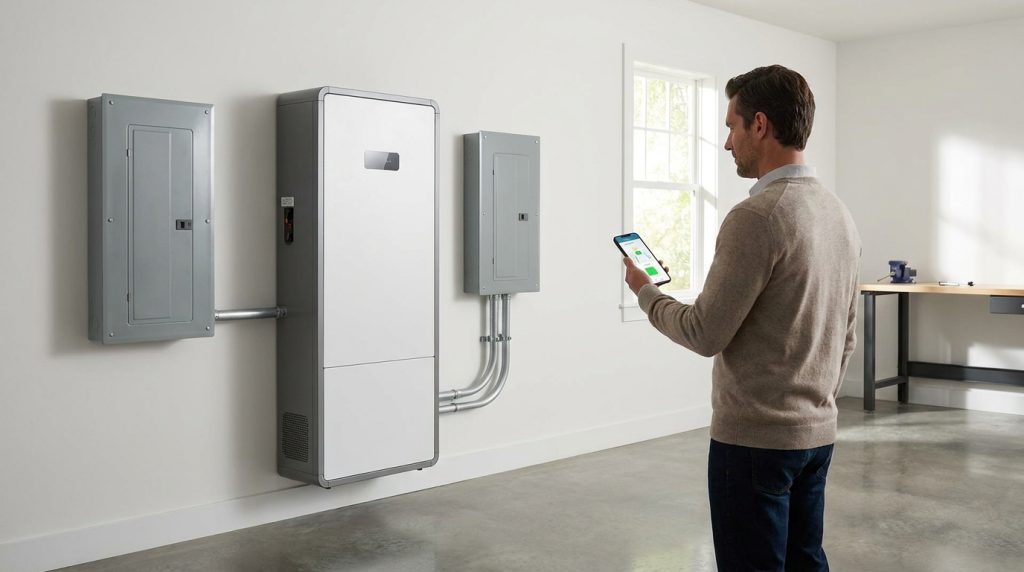
An all-in-one solar battery system combines the inverter, battery storage, battery management, solar charging control, and monitoring layer into one coordinated unit. For a new PV home, it reduces separate boxes and makes the system easier to install and manage.
For a homeowner, the easiest way to understand it is this: the system becomes the energy hub between the solar panels, the battery, the grid, and the backed-up home circuits. Solar panels are usually installed separately on the roof, but they connect into the all-in-one unit through the system’s solar input.
This makes it different from a separate battery setup, where the inverter, battery modules, controller, and monitoring layer may come from different product families. A separate setup can still work well, but it often needs more compatibility checks and more space.
The broader planning topic belongs in a full home energy storage system guide. This article focuses on one use case: a homeowner adding solar and battery storage from day one.
What parts are inside the box, and what does each one do?
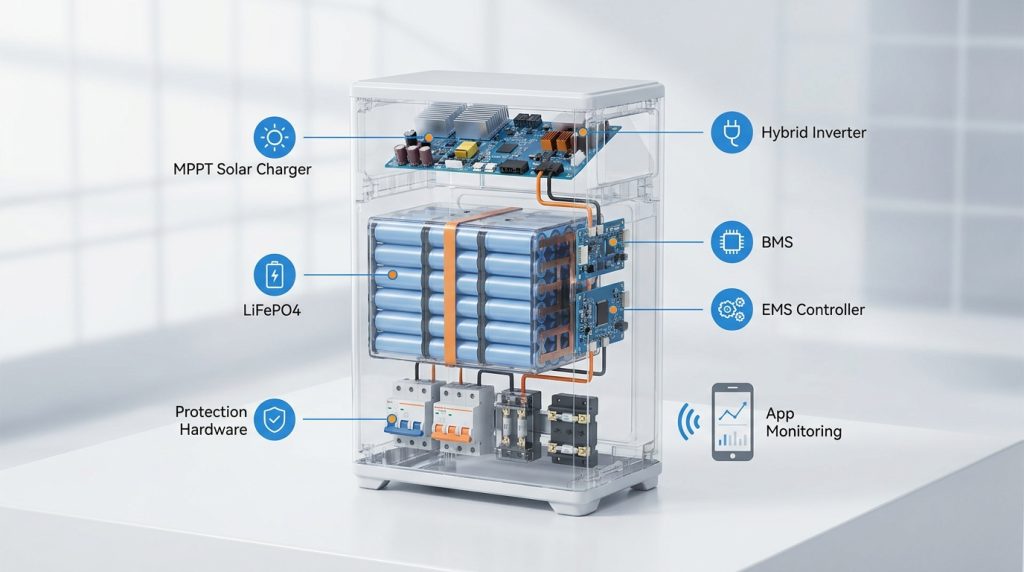
The key parts are the MPPT solar charger, hybrid inverter, LiFePO4 battery stack, BMS, EMS/controller, protection hardware, and monitoring app. Together, they decide where solar power goes, when the battery charges, and what loads receive backup.
An all-in-one ESS sounds simple from the outside, but it still has several important layers inside. The value comes from those layers being designed to work together. The table below shows what each part does in a new PV-plus-battery install.
| Part | What it does | Why it matters to the homeowner |
|---|---|---|
| MPPT solar charger | Tracks solar panel output and manages PV charging | Helps the system collect usable solar power during changing sunlight |
| Hybrid inverter | Converts DC and AC power and manages grid, solar, battery, and backup modes | Controls how power moves between the roof, battery, home, and grid |
| LiFePO4 battery stack | Stores energy for evening use and backup | Gives the home usable stored power with stable battery chemistry |
| BMS | Protects the battery cells from unsafe operating conditions | Helps protect the battery and support long-term reliability |
| EMS or controller | Coordinates charging, discharge, backup reserve, and system modes | Creates one control point for installer setup and homeowner monitoring |
| App monitoring | Shows solar, battery, home load, and grid activity | Helps the homeowner see what the system is doing each day |
A LiFePO4 battery stack is common in residential storage because it is designed for stable home energy use. If the reader needs deeper battery chemistry guidance, link the full LiFePO4 home battery guide instead of repeating that full topic here.
How does power flow from the roof to the battery and home?
In a typical setup, solar power first serves the home, then charges the battery when production exceeds demand. Later, the battery discharges for evening use, peak-rate periods, or backup loads during outages.
During the day, the PV panels produce DC power. The MPPT solar charger manages that input, and the hybrid inverter sends usable power to home loads. If solar production is higher than the home’s current demand, the system can charge the battery for later use.
A simple daily flow looks like this:
- Solar panels produce power during daylight.
- Live home loads use solar power first.
- Extra solar charges the battery.
- The battery supplies power after sunset or during selected grid events.
- Backup circuits receive stored power during an outage if the system is wired for backup.
Battery storage helps homeowners use solar energy when the sun is not producing, and the U.S. Department of Energy explains that solar-plus-storage can support power use beyond daylight hours when the system is designed correctly. For outage support, the system needs proper inverter and storage configuration, not panels alone. You can read the broader principle in the DOE’s guide on battery storage with solar energy systems.
Why does all-in-one make a new PV-plus-battery install simpler?
All-in-one systems simplify new PV-plus-battery installs because the inverter, battery, communication, and monitoring layers are designed as one package. That usually means fewer compatibility checks, cleaner wiring, and a more predictable commissioning process.
The biggest advantage appears when the homeowner is adding solar and storage from scratch. The installer does not need to combine a battery from one brand, an inverter from another, and a separate monitoring layer. That can reduce communication issues between devices.
| Install area | All-in-one system | Split equipment setup |
|---|---|---|
| Wall space | Fewer main devices | More separate boxes |
| Communication | Designed as one system | Compatibility must be checked |
| Commissioning | One main control layer | More device-level setup |
| App experience | Usually one homeowner app | May need multiple portals |
| Support path | One product family | More supplier coordination |
This does not mean the job is plug-and-play for the homeowner. A qualified installer still needs to check PV input, grid wiring, protection devices, backup circuits, and local permit needs. For the deeper install path, link readers to the home ESS installation guide.
What would a Voltalink-style 5kW + 10kWh reference build look like?
A practical reference build for many new PV homes starts with a 5kW hybrid inverter class and about 10kWh of LiFePO4 battery storage. The goal is not to promise whole-home backup. The goal is to cover daily solar storage and essential backup first.
Energy storage is usually discussed in two different numbers: power capacity in kW and energy capacity in kWh. The DOE explains this difference in its guide to solar energy and storage basics. In simple terms, 5kW describes how much power the inverter can deliver at once, and 10kWh describes how much energy the battery can store.
| Component | Example value | What it does | Homeowner decision point |
|---|---|---|---|
| Hybrid inverter | 5kW class | Runs selected home loads and manages solar, battery, grid, and backup | Check whether large loads need backup |
| Battery | 10kWh LiFePO4 | Stores solar energy for evening use and outages | Size around real evening use and backup goals |
| PV input | Based on roof and MPPT limits | Feeds solar power into the system | Installer must match panel design to input range |
| Backup circuits | Essential loads first | Keeps key circuits running during outage events | Choose refrigerator, lights, router, and select outlets first |
| App monitoring | Solar, battery, load, grid data | Shows daily system behavior | Confirm app access before handoff |
| Expansion | Add modules if supported | Increases storage later | Plan ahead if EV or heat pump loads may grow |
Example load plan for essential backup
A homeowner may choose refrigerator, basic lighting, Wi-Fi router, phone charging, and a few outlets as backup circuits. This is more realistic than trying to run central AC, electric heating, and EV charging from a starter 10kWh battery.
For deeper capacity planning, the writer should point readers to home battery sizing. The article should keep the example simple and buyer-focused.
What this build should not promise
A 10kWh battery sounds large, but it should not be sold as whole-home backup without checking inverter output, surge loads, and backed-up circuits. If the homeowner expects the battery to run everything, the installer must review the load panel before quoting.
What happens during single-controller commissioning?
Single-controller commissioning means the installer configures PV input, inverter mode, battery communication, backup reserve, grid behavior, and app monitoring from one control layer. The homeowner should leave with confirmed settings, app access, and a tested backup mode.
This is one of the main reasons an all-in-one system can feel easier after installation. The installer does not need to set up several unrelated devices and hope they communicate correctly. The main controller coordinates the battery, inverter, solar charging, operating modes, and monitoring.
A clean handoff should include this checklist:
- Confirm PV strings are connected within the system’s allowed input range.
- Confirm battery modules are detected by the BMS and controller.
- Set grid mode, backup mode, and export behavior where allowed.
- Set the backup reserve, such as keeping stored energy for outage use.
- Configure time-of-use charging or discharge rules if the home needs them.
- Pair the homeowner app and confirm login access.
- Test backup operation on selected circuits.
- Explain alerts, operating modes, and normal daily readings.
For outage planning, the DOE explains that solar with storage can support islanded operation only when the system is configured to disconnect safely from the grid during outages. That is why commissioning is not just a software step. It also confirms the system’s real backup behavior. Link the deeper installer handoff to a commissioning checklist.
What will the homeowner see in the app after installation?
The app should show solar production, battery state of charge, home load, grid import or export, backup reserve, and operating mode. A useful app helps the homeowner see whether the system is saving energy, charging correctly, and ready for outages.
The app is not a bonus feature. For a homeowner, app visibility is part of the system value because it shows whether solar, battery, grid, and backup reserve are behaving as expected. Without that view, the system can feel like a silent box on the wall.
A useful day-one dashboard should show:
- Current solar production in watts or kilowatts
- Battery percentage and reserve setting
- Home consumption
- Grid import or export
- Battery charging or discharging status
- Backup or grid-connected mode
- Alerts and operating messages
- Daily or monthly energy history
The DOE notes that battery storage can help homeowners monitor energy production and use. That matters because the homeowner can see when the battery charges, when it supports loads, and whether the system is ready before storm season or planned grid work.
When is an all-in-one system the right choice, and when is it not?
An all-in-one system is the right choice when the home is getting new solar and battery storage together, the owner wants fewer devices, and one app is preferred. It is not always the best choice for every retrofit or unusual load plan.
This is where the buyer needs honest guidance. An all-in-one solar battery box works best for clean new installs, but a split system can be safer when the home already has a compatible inverter or special backup needs.
| Home situation | Better choice | Why | What to ask the installer |
|---|---|---|---|
| New solar plus battery install | All-in-one | Cleaner equipment plan from day one | Can the PV design match the MPPT range? |
| Small garage or wall space | All-in-one | Fewer visible devices | How much clearance does the unit need? |
| One-brand support matters | All-in-one | Easier support path | Who handles warranty and app support? |
| Existing solar inverter already installed | Case-by-case | Retrofit compatibility may limit choices | Can the current inverter work with this battery? |
| Large whole-home backup goal | Case-by-case | Inverter output and surge loads matter | Which loads will be backed up? |
| Future EV or heat pump plan | Plan expansion first | Storage demand may grow | Can the battery stack expand later? |
This is also the right place to link readers to a full all-in-one vs split-stack comparison. Keep this section focused on the new PV-home decision.
What should you confirm before buying?
Before buying, confirm the system fits your roof design, load panel, backup needs, battery capacity target, and app expectations. A clean cabinet does not matter if the system is undersized or wired for the wrong circuits.
Use this buyer checklist before asking for a quote:
- Does the MPPT input range match the planned PV strings?
- Is the inverter output enough for selected backup loads?
- What is the usable battery capacity, not only the nameplate capacity?
- Is the battery chemistry LiFePO4?
- Which circuits will be backed up during outages?
- Can the battery stack expand later?
- Does the homeowner get app access after commissioning?
- What warranty and support path applies?
- Are local permits and code requirements included in the install plan?
- Does the quote include backup panel work if needed?
Cost still matters, but it should come after system fit. A cheaper system that does not support your backup loads can become expensive later. For the financial side, send readers to a separate payback estimate guide instead of turning this article into a cost article.
Getting the Next Step Right
An all in one solar battery system is a strong choice for homeowners who are adding PV and storage together from day one. Start with the load plan, not the cabinet size. A 5kW + 10kWh system can be a practical reference point, but the final design should match your roof, backed-up circuits, surge loads, and expansion plans.
Ask your installer to show the PV input design, battery settings, backup reserve, app dashboard, and commissioning checklist before final handoff. That is the difference between buying a clean-looking battery box and getting a home energy system you can trust.
Frequently Asked Questions
What is an all-in-one solar battery system?
An all-in-one solar battery system combines the hybrid inverter, battery, solar charging control, BMS, EMS, and app monitoring into one coordinated unit. It is designed to reduce separate equipment and simplify solar-plus-battery installation.
How do I size an all-in-one solar and battery system for my home?
Start with the loads you want to run, not only the solar panel size. Check daily evening use, outage backup needs, inverter output, surge loads, and usable battery capacity before choosing the system size.
Can an all-in-one ESS run an entire house during an outage?
It can run an entire house only if the inverter output, battery capacity, surge rating, and backup wiring are designed for whole-home backup. Many homes are better served by backing up selected critical circuits first.
What is the difference between a hybrid inverter and a standard solar inverter?
A hybrid inverter manages solar input, battery charging, grid interaction, and backup behavior. A standard solar inverter mainly converts solar DC power into AC power for immediate home use or export.
Are all-in-one systems easier to install than separate components?
Usually yes, because the inverter, battery, communication, and monitoring layers are designed to work together. The install still needs correct sizing, code-compliant wiring, proper backup circuit planning, and professional commissioning.
Can I use an all-in-one battery with my existing solar system?
Sometimes, but compatibility depends on your existing inverter, wiring, grid rules, and battery communication requirements. This article focuses on new PV-plus-battery installs, where all-in-one systems usually make the cleanest sense.
How does smart monitoring improve solar battery performance?
Smart monitoring shows solar production, home consumption, battery level, grid import/export, and operating mode. This helps homeowners adjust reserve settings, spot unusual behavior, and understand whether the battery is charging and discharging as expected.

-

 OEM Residential Energy Storage Solutions: Passive vs. Active Cell Balancing
2026-09-30
-
 Smart Home Battery with BMS Communication: Cybersecurity and BMS Safety
 -
 10kWh Home Battery Backup System: Is 90% DoD Better for Daily Solar Storage?
2026-09-29
-
 Integrated Home Energy Storage System 150–430V MPPT Design
2026-09-28
-
 LiFePO₄ Residential Backup Battery SOC Accuracy in Parallel Systems
Share this:





.svg)






-899.svg)


