




Home ESS Systems: Anatomy, Wiring & Setup Map
A home ESS system is a coordinated battery storage setup that stores solar or grid electricity and sends it back to the home through a hybrid inverter. The key parts are the battery pack, BMS, inverter, EMS, transfer path, AC/DC isolators, and protection devices. A good setup map should show both energy flow and failure protection.
A home battery can look simple from the outside, but the inside story matters. If you understand the parts, you can ask better questions, avoid unsafe shortcuts, and choose a system that fits your home. This guide walks through the anatomy, wiring flow, protection layers, and wall-mount setup logic behind a working residential ESS.
What is a home ESS system, in simple terms?
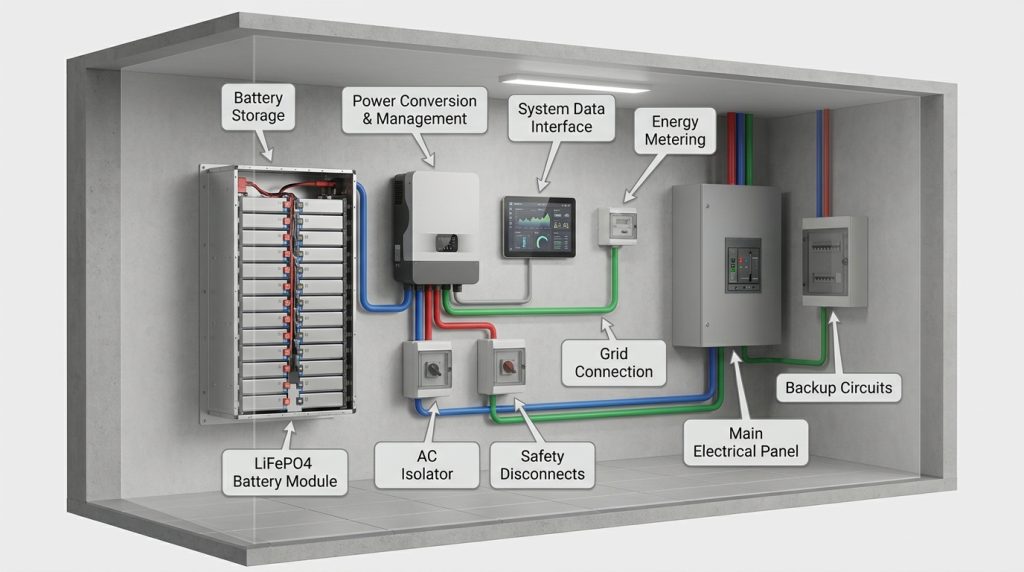
A home ESS system stores electricity in a battery and releases it when the home needs power. The battery, BMS, inverter, EMS, isolators, and transfer equipment work together to make stored energy usable and safer.
ESS stands for Energy Storage System. In a home, it usually means a battery-based setup that stores power from solar panels, the grid, or both. That stored power can run selected loads at night, during peak-rate hours, or during outages.
A home ESS is more than a battery box. It needs power conversion, protection, monitoring, and safe switching. If you want the broader buying path, sizing logic, and system options, start with this home energy storage guide. For basic solar storage context, the U.S. Department of Energy explains how storage helps solar power serve homes when the sun is not shining.
Which parts make up a working home ESS?
A working residential ESS has several parts that act as one system. The battery stores DC power, the inverter turns it into usable AC power, and the control system decides when power should move.
| Part | What it does | What the homeowner should understand |
|---|---|---|
| Battery rack or wall-mount battery | Stores energy as DC electricity | Capacity tells you how much energy it can store |
| BMS | Monitors cells, voltage, current, temperature, and safety limits | It protects the battery from unsafe operation |
| Hybrid inverter | Converts DC battery or solar power into AC power | Its power rating affects what loads can run |
| EMS or HEMS | Controls charge, discharge, backup reserve, and monitoring | It decides when stored energy should be used |
| MPPT | Tracks solar panel output for better charging | It sits inside many hybrid inverters |
| Smart meter or CT clamp | Measures home and grid power flow | It helps the EMS make better decisions |
| AC isolator | Disconnects AC-side circuits when needed | It supports safe service and fault isolation |
| DC isolator | Disconnects DC battery or solar circuits when needed | It matters because DC faults can be serious |
| Transfer switch or backup output | Separates backup circuits during an outage | It helps stop unsafe grid backfeed |
| Critical load panel | Holds selected backup circuits | It keeps backup focused on priority loads |
Homey’s ESS explainer also separates the battery unit, BMS, power conversion system, and energy management system. That structure is useful because it shows why battery capacity alone does not tell the full story.
How does power move through a home ESS during normal use?
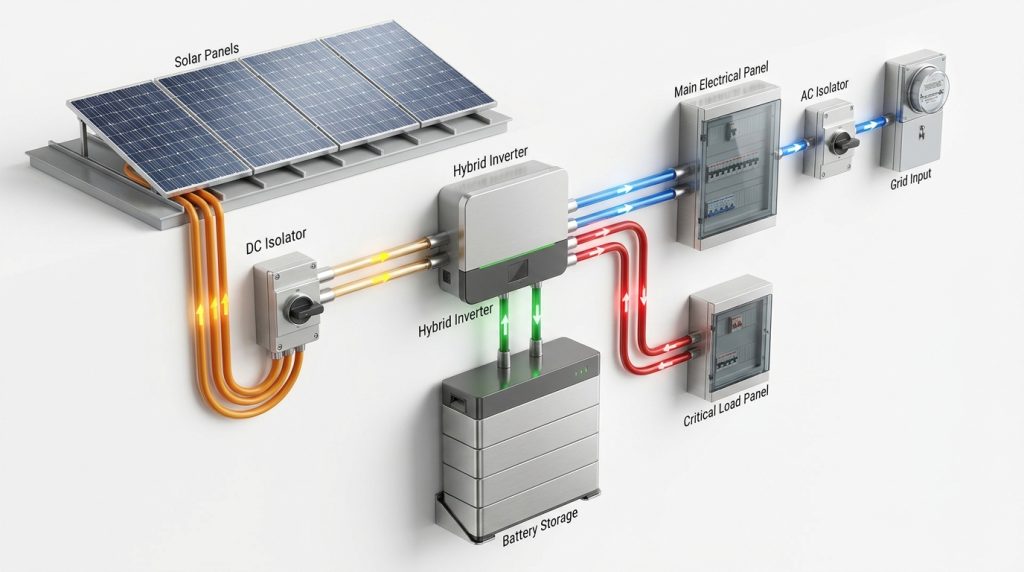
In normal operation, a home ESS routes solar or grid energy into the battery, then sends stored energy back through the hybrid inverter as AC power. The EMS decides when to charge, discharge, export, or reserve backup capacity.
Power flow depends on the source, the home load, and the settings. During the day, solar panels may power the home first. Extra solar can charge the battery. At night or during high electricity rates, the battery can discharge through the inverter to support home loads.
The U.S. Department of Energy notes that solar-plus-storage can help supply power beyond sunny hours and support time-of-use shifting. That is why the control logic matters. A good setup does not just store energy, it sends energy where it helps most.
| Situation | Typical power flow | What the ESS is trying to do |
|---|---|---|
| Sunny day, home using power | Solar to inverter to home loads | Use solar directly first |
| Solar surplus | Solar to inverter to battery | Store extra power |
| Evening load | Battery to inverter to home loads | Reduce grid use |
| Grid outage | Battery to inverter to critical loads | Keep selected circuits running |
| Off-peak grid charging | Grid to inverter to battery | Store lower-rate electricity if allowed |
What happens when the battery is full?
When the battery is full, the system stops charging or limits charging. Solar may continue powering home loads. Extra power may export to the grid if allowed, or the inverter may curtail production based on settings and local rules.
This is one reason installer setup matters. The same battery can behave differently depending on inverter settings, utility rules, export limits, and backup reserve targets.
What should the labeled home ESS diagram show?
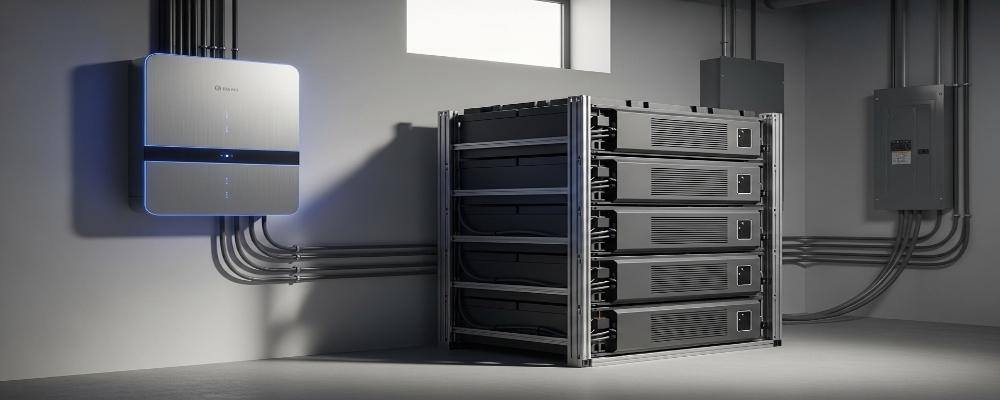
A useful ESS diagram should show the full path of power, not only the battery. It should label the PV input, inverter, battery, BMS, grid connection, backup loads, isolators, and monitoring layer.
Labeled home ESS anatomy map:
[PV Array]
    |
    v
[DC Isolator for PV]
    |
    v
[Hybrid Inverter with MPPT] <------> [EMS or HEMS] <------> [Monitoring App]
    |        ^
    |        |
    v        |
[AC Isolator]
    |
    v
[Main Panel] <------> [Grid]
    |
    v
[Critical Load Panel]
    |
    v
[Backup Loads: fridge, lights, router, outlets]

[Wall-Mount Battery or Battery Rack]
    |
    v
[Battery DC Isolator or Breaker]
    |
    v
[BMS: voltage, current, temperature, cell balance]
    |
    v
[Hybrid Inverter Battery Input]
The diagram should also mark the direction of normal power flow and backup power flow. For a homeowner, the goal is not to memorize every wire. The goal is to see which parts store power, convert power, control power, and disconnect power during service or faults.
How should a VoltaLink wall-mount ESS wiring schematic be explained safely?
A VoltaLink wall-mount ESS schematic should show connection logic, not DIY wiring instructions. The safe map is battery to BMS to hybrid inverter, PV and grid inputs to inverter, and inverter output to protected home or critical-load circuits.
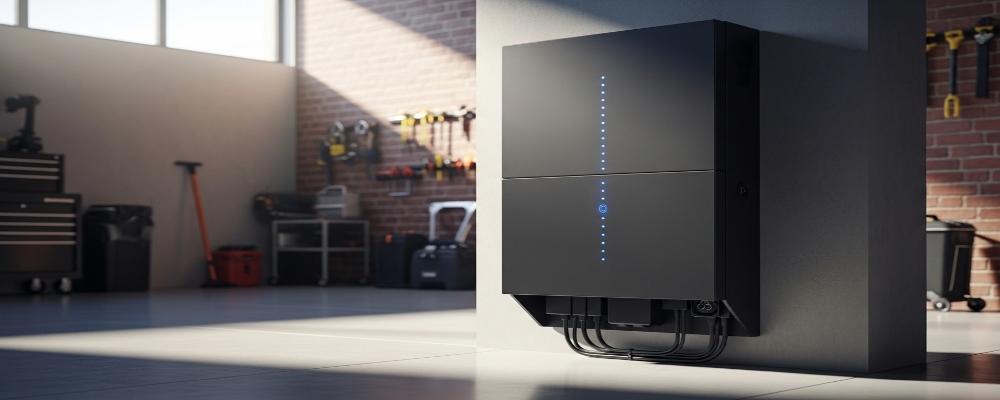
For a VoltaLink wall-mount install, the schematic callout should show the battery mounted near a compatible hybrid inverter. The battery connects on the DC side through the approved battery path. The PV input, grid input, AC output, and backup load path should be labeled separately.
Use this section as a homeowner-friendly map, not a wiring manual. Final cable sizing, breaker choice, grounding, polarity checks, and protection device placement must follow manufacturer instructions and local electrical code. The EPRI residential ESS safety guide recommends certified equipment, qualified installers, local code compliance, clearances, monitoring, and smoke or heat detection.
VoltaLink wall-mount schematic callout:
| Connection point | What to label | Why it matters |
|---|---|---|
| Wall-mount battery to BMS | Battery voltage, communication, temperature monitoring | Shows how the battery reports safe operating limits |
| BMS to hybrid inverter | Battery DC path and communication link | Lets the inverter charge and discharge within safe limits |
| PV input to inverter | PV DC isolator and MPPT input | Separates solar charging from battery output |
| Grid input to inverter | AC breaker, meter, and main panel side | Shows where grid power enters the system |
| Inverter output | Backup output or protected circuits | Shows which loads can run during an outage |
| EMS or app | State of charge, alarms, power flow | Helps the owner monitor the system without touching wiring |
For a deeper setup sequence, use the VoltaLink residential energy storage setup guide after confirming the exact system model and installer requirements.
What can fail in each ESS component, and what protects against it?
Every home ESS part has a failure mode, so protection must be layered. The BMS protects cells, the inverter manages power conversion, breakers and isolators disconnect faults, and EMS monitoring helps detect abnormal behavior early.
Safety is not one device doing all the work. It is a chain of protection. The battery, inverter, isolators, breakers, monitoring app, and installer checks all reduce different risks. UL notes that ESS codes and installation requirements often reference safety testing standards such as UL 9540A.
| Component | What can fail | Warning sign | Protection layer | Homeowner action | Installer action |
|---|---|---|---|---|---|
| Battery cells | Overheating, imbalance, low voltage | Alarm, reduced output, abnormal heat | BMS, temperature sensors, shutdown logic | Do not reset repeatedly | Inspect battery data and fault logs |
| BMS | Sensor or communication fault | Battery stops charging or discharging | Fault shutdown, inverter communication limits | Record error message | Check wiring, firmware, and communication cable |
| Hybrid inverter | Overload or conversion fault | Output trips, error code, fan noise | Breaker, inverter protection, EMS control | Reduce loads and call support | Test output, load profile, and settings |
| DC wiring | Loose terminal, wrong polarity, arc risk | Heat, smell, alarm, visible damage | DC isolator, fuse, breaker, correct torque | Keep away and shut down if instructed | Inspect terminals, polarity, and cable rating |
| AC wiring | Overcurrent or unsafe backfeed | Breaker trip, unstable backup output | AC breaker, transfer path, critical-load panel | Do not bypass protection | Verify circuit separation and breaker sizing |
| Transfer path | Incorrect load isolation | Backup power fails or trips | Transfer switch or backup output design | Note which loads failed | Test grid-outage mode and protected circuits |
| EMS or monitoring | Wrong settings or missed alarms | Unexpected charging behavior | App alerts, smart meter, installer setup | Check app status regularly | Correct reserve, export, and time settings |
| Mounting area | Blocked clearance or heat buildup | High temperature warning | Clearances, ventilation, detector placement | Keep area clear | Confirm placement and code compliance |
A bigger battery is not always the smarter choice. It works when the inverter, protected loads, clearance, and installation plan match the capacity. An oversized battery with a weak design can cost more and still fail to power the loads the homeowner cares about.
What installation checks matter before commissioning?
The most important commissioning checks confirm that the equipment is compatible, mounted safely, protected correctly, and configured for the home’s actual load plan. A system should not be energized just because the hardware is on the wall.
The U.S. Department of Energy’s fire safety guidance for solar systems warns that problems can come from poor installation, poor maintenance, or misuse. For ESS, that means the installer should check both electrical safety and everyday user safety before handover.
Pre-commissioning checklist:
- Confirm the battery model is compatible with the hybrid inverter.
- Confirm the battery capacity and inverter output match the backup load plan.
- Check battery mounting surface, clearance, and service access.
- Verify DC polarity before energizing the battery circuit.
- Confirm AC and DC isolators are labeled and reachable.
- Confirm breakers, fuses, and surge protection match the design.
- Test BMS-to-inverter communication.
- Set backup reserve, time-of-use mode, and grid charging rules.
- Test the monitoring app and fault alerts.
- Confirm smoke or heat detection near the ESS location where required.
- Check local inspection, permit, and utility approval needs.
A wall-mount ESS is clean and space-saving, but it should not be treated like a plug-in appliance. The homeowner can understand the schematic. The final wiring belongs to a qualified installer.
Can a home ESS work without solar panels?
Yes, a home ESS can work without solar if it supports grid charging. It can charge during off-peak periods, discharge during high-rate periods, and provide backup power, while leaving room for future solar integration.
A battery-only setup can make sense for homeowners who want backup power now and solar later. The inverter must support grid charging, and the installer should confirm whether local rules allow the intended charging and backup mode.
For example, a homeowner without solar may charge the battery overnight during a lower-rate period. During a short outage, the battery can run selected loads like a refrigerator, router, lights, and phone charging. If solar is added later, the inverter and battery design must already support that upgrade.
All-in-one systems can reduce wiring complexity, but they are not always better than split systems. A split system can be a better fit when the homeowner wants flexible battery expansion or a specific hybrid inverter. The right choice depends on the load plan, service panel layout, and future solar goals.
How should homeowners monitor and maintain a home ESS?
Homeowners should monitor the system through the app and keep the installation area safe. They should not open electrical equipment, bypass alarms, or keep resetting faults without an installer.
The EPRI residential ESS safety guide recommends following manufacturer instructions, keeping clearances, and using monitoring. A good owner routine is simple: watch state of charge, check for alerts, keep the area clear, and call support when something looks wrong.
Homeowner monitoring checklist:
- Check state of charge before expected storms or outages.
- Watch for temperature, communication, or battery fault alarms.
- Keep boxes, tools, and storage items away from the battery area.
- Keep the app connected and notifications enabled.
- Ask the installer before changing backup reserve or grid-charging settings.
- Call support if you notice swelling, smoke, odor, unusual heat, water damage, or repeated trips.
A practical example: if a loose DC connection creates heat, the homeowner may only see an alarm or smell something unusual. The safe response is not to tighten terminals. The safe response is to stop using the system if instructed and call the installer.
What should you ask an installer before buying a home ESS?
Before buying, ask questions that connect the battery, inverter, protected loads, protection devices, and warranty into one plan. A good quote should explain what the system will power, what it will not power, and how it will behave during an outage.
Installer question checklist:
- Is this battery compatible with the hybrid inverter you recommend?
- Which circuits will be in the critical load panel?
- What inverter power rating do I need for my real loads?
- What happens when the grid goes down?
- Can the battery charge from the grid?
- Can I add solar later?
- Where will the AC and DC isolators be placed?
- Which protection devices are included?
- What codes, permits, and inspections apply here?
- What does the warranty require for installation and maintenance?
For a small outage backup plan, the homeowner may only need a refrigerator, lights, router, and a few outlets. That is different from backing up air conditioning, pumps, or a whole home. Battery kWh matters, but protected circuits and inverter output decide what actually runs.
If the next question is system type, compare this article with the hybrid solar battery guide. That broader page should handle full selection logic, while this article stays focused on anatomy, wiring flow, and protection.
Getting the Next Step Right
A home ESS system should be chosen around real loads, safe wiring, and clear protection layers. Do not buy by battery size alone. Ask for a labeled diagram, a backup load list, protection device details, and a clear commissioning plan before approving the system.
For VoltaLink wall-mount installations, use the schematic as a discussion tool with your installer. The best setup is one you can understand, monitor, and maintain without touching unsafe electrical parts.
Frequently Asked Questions
What is an energy storage system and how does it work?
A home energy storage system stores electricity in a battery and releases it later through an inverter. It can use solar power, grid power, or both, depending on the system design and inverter settings.
Can I install an ESS without solar panels?
Yes, a home ESS can work without solar if the system supports grid charging. It can store lower-rate grid electricity, supply backup power, and later connect to solar if the inverter and design allow it.
Are ESS systems safe?
ESS systems can be safe when certified equipment is installed by qualified professionals and maintained correctly. The main safety risks come from poor installation, misuse, blocked clearance, electrical faults, or ignored warning signs.
What happens if the battery is fully charged?
When the battery is full, the system usually stops charging, sends available solar power to home loads, exports if allowed, or limits extra generation. The exact behavior depends on inverter settings and local grid rules.
How long do residential batteries last?
Battery life depends on chemistry, cycle depth, temperature, installation quality, and usage pattern. Do not trust a single lifespan claim without checking cycle rating, warranty terms, and manufacturer operating limits.
Do I need permits to install a home storage system?
Many locations require code-compliant installation, inspection, or utility approval for residential ESS. The safe answer is to check local rules before purchase and use a licensed installer familiar with battery storage requirements.
How do I select the right energy storage system for my power needs?
Start with backup loads, outage duration, inverter power, battery capacity, solar plans, and installation space. Do not size by battery kWh alone because inverter output and protected circuits decide what the system can actually run.

-

 OEM Residential Energy Storage Solutions: Passive vs. Active Cell Balancing
2026-09-30
-
 Smart Home Battery with BMS Communication: Cybersecurity and BMS Safety
 -
 10kWh Home Battery Backup System: Is 90% DoD Better for Daily Solar Storage?
2026-09-29
-
 Integrated Home Energy Storage System 150–430V MPPT Design
2026-09-28
-
 LiFePO₄ Residential Backup Battery SOC Accuracy in Parallel Systems
Share this:





.svg)






-899.svg)


